PaysafeCard direct and PaysafeCash REST API
The PaysafeCard direct and PaysafeCash REST API enables business partners to process barcode-based transactions at the point of sale.
Both products follow the same initial order flow. The business partner prepares the transaction, verifies the product returned by the API, and confirms the order. The final customer-facing step differs between the standard PaysafeCard direct or PaysafeCash payment flow and the PaysafeCash POS cashout flow.
PaysafeCard direct and PaysafeCash process
A PaysafeCard direct or PaysafeCash order is processed as follows:
-
The customer brings a barcode to the point of sale.
-
The POS employee scans the barcode or enters the barcode number manually. The product and fee model are detected automatically from the selected barcode.
-
The business partner sends the
prepareOrderrequest to the PaysafeCard system. -
PaysafeCard performs validation checks, including limits and account status. A successful response returns the order with the status
PREPARED. -
Optionally, the business partner can send the
cancelOrderrequest at this stage. The resulting order status isWITHDRAWN. -
The business partner compares the product detected from the barcode with the product returned by
prepareOrder. This check helps prevent barcode manipulation. -
The business partner sends the
confirmOrderrequest using the order ID returned byprepareOrder. -
PaysafeCard performs another set of validation checks, including limits and account status. A successful response returns the order with the status
DELIVERED. -
The business partner system prints a voucher containing the required transaction information and gives it to the customer.
-
An optional cool-down period begins. The documented default is five minutes. During this period, the business partner can send the
cancelOrderrequest. A successfully cancelled order has the statusCANCELLED.If the order is cancelled, the business partner system prints a cancellation receipt and gives it to the customer.
-
PaysafeCard executes the payment and notifies the customer.
PaysafeCash POS cashout process
A PaysafeCash POS cashout order is processed as follows:
-
The customer brings a barcode to the point of sale.
-
The POS employee scans the barcode or enters the barcode number manually. The product and fee model are detected automatically from the selected barcode.
-
The business partner sends the
prepareOrderrequest to the PaysafeCard system. -
PaysafeCard performs validation checks, including limits and account status. A successful response returns the order with the status
PREPARED. -
Optionally, the business partner can send the
cancelOrderrequest at this stage. The resulting order status isWITHDRAWN. -
The business partner compares the product detected from the barcode with the product returned by
prepareOrder. This check helps prevent barcode manipulation. -
The business partner sends the
confirmOrderrequest using the order ID returned byprepareOrder. -
PaysafeCard performs another set of validation checks, including limits and account status. A successful response returns the order with the status
DELIVERED. -
The business partner system prints a voucher containing the required transaction information. The voucher and the correct cash amount are given to the customer.
-
An optional cool-down period begins. The documented default is five minutes. During this period, the business partner can send the
cancelOrderrequest. A successfully cancelled order has the statusCANCELLED.If the order is cancelled, the business partner system prints a cancellation receipt and gives it to the customer.
Errors not listed in the catalog may be communicated as general_technical_error. For further information, use the appropriate PaysafeCard integration or technical support contact.
Operational reference
- PaysafeCash POS cashout API response objects
- PaysafeCash POS cashout error codes
- How to handle a lost response
- Customer limits
- Shop registration
- Reconciliation and sales reporting
PaysafeCash POS cashout API response objects
The reusable schemas for the POS cashout operations are available in the Schemas section:
PrepareCashoutResponsefor prepare orderConfirmCashoutOrderResponseandCashoutCardfor confirm orderCancelCashoutOrderResponsefor cancel orderRetrieveCashoutOrderResponse,RetrieveCashoutCard, andOrderStatusfor retrieve order
The response objects use the following fields where applicable:
amount: The order amount.currency: The order currency.card.amount: The face value of the card assigned to the order.card.currency: The currency of the order in ISO 4217 format.card.serial: The serial number of the card assigned to the order.card.product_id: The product ID of the card assigned to the order.distributor_id: The business partner ID assigned by PaysafeCard.order_id: The order ID generated by the API or derived from theCorrelation-IDheader.shop_id: The shop from which the request was made.terminal_id: The terminal from which the request was made.order_status:PREPARED,DELIVERED,REJECTED,WITHDRAWN,CANCELLED, orEXPIRED.delivery_type: AlwaysACCOUNTfor PaysafeCash.
PaysafeCash POS cashout error codes
Coming soon.
No POS-cashout-specific error-code catalog is defined in the available source.
How to handle a lost response
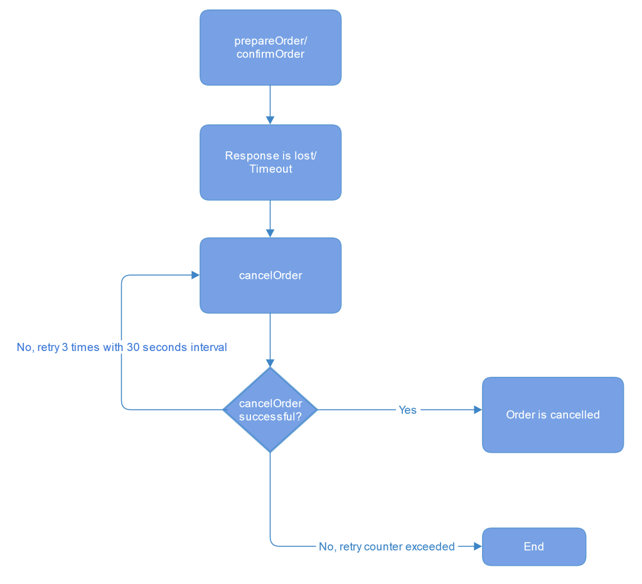
If the business partner does not receive a response to a prepare order or confirm order request, a lost-response mechanism must be implemented to avoid an order mismatch between the business partner system and PaysafeCard.
The recommended flow is:
- A prepare order or confirm order response is lost because of a timeout.
- Send cancel order.
- If cancel order succeeds, the order is cancelled.
- If cancel order does not succeed, retry cancel order three times at 30-second intervals.
- If the retry counter is exceeded, end the retry flow.
It is crucial to use Correlation-ID so cancel order can target the correct order ID.
Customer limits
Fully verified PaysafeCard customers with account status FDD are not affected by existing Pin-on-Demand terminal limits. A separate terminal limit applies to these customers.
The documented limit is EUR 2,500 for 12 hours, or the equivalent value in another currency. When the limit is reached, the system returns:
{
  "code": "fdd_terminal_limit_reached",
  "message": "FDD terminal limit reached",
  "number": 3202
}
Shop registration
Accurate information about where a Paysafe product sale takes place must be provided for regulatory reasons.
See Shop registration.
Reconciliation and sales reporting
PaysafeCard direct and PaysafeCash orders are included in the daily Pin-on-Demand reconciliation file. The order type can be distinguished by the ninth parameter, customer identification type, and the tenth parameter, delivery type.
- Classic vouchers use customer identification type
NONE; PaysafeCard direct and PaysafeCash useACCOUNT. - Classic vouchers use delivery type
RETURN; PaysafeCard direct and PaysafeCash useACCOUNT.
The displayed reconciliation example contains these fields in sequence:
Distributor order id, UTC offset, Order date and time, Distributor id, Retailer id, Shop id, Terminal id, Customer identification type, Delivery type, Country code, Face value, Product id, Serial, Order status, and Error code.