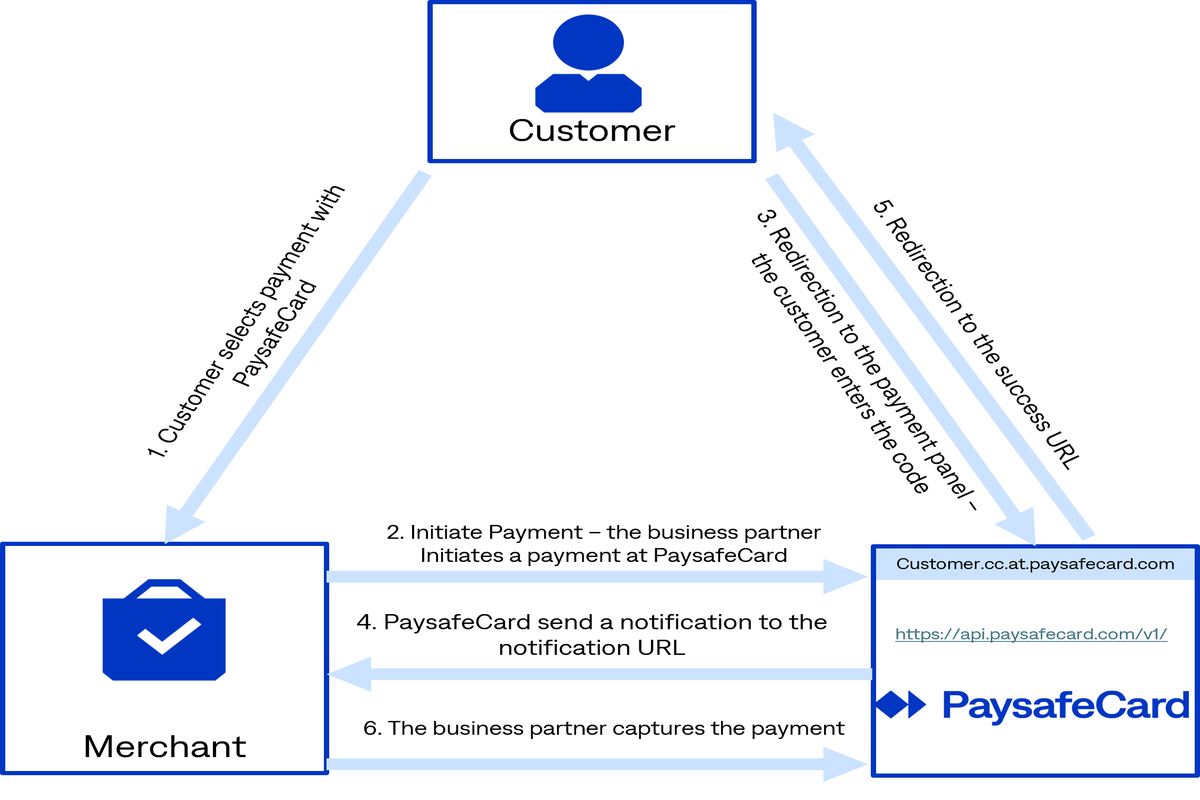
Functional payment flow
The functional payment flow works as follows:
- The customer selects PaysafeCard as the preferred payment option in your webshop.
- You initiate a payment with the correct amount, currency and other parameters.
- You re-direct the customer to PaysafeCard's hosted payment panel, where the customer has 30 minutes to enter the 16-digit PaysafeCard PIN. In the section "Payment page details" below you can find additional information important for the correct integration of PaysafeCard's hosted payment page.
- PaysafeCard sends a notification to the notification URL.
- PaysafeCard re-directs the customer back to the success URL.
- You capture the payment (additional information can be found in the section "Capturing a payment" below).
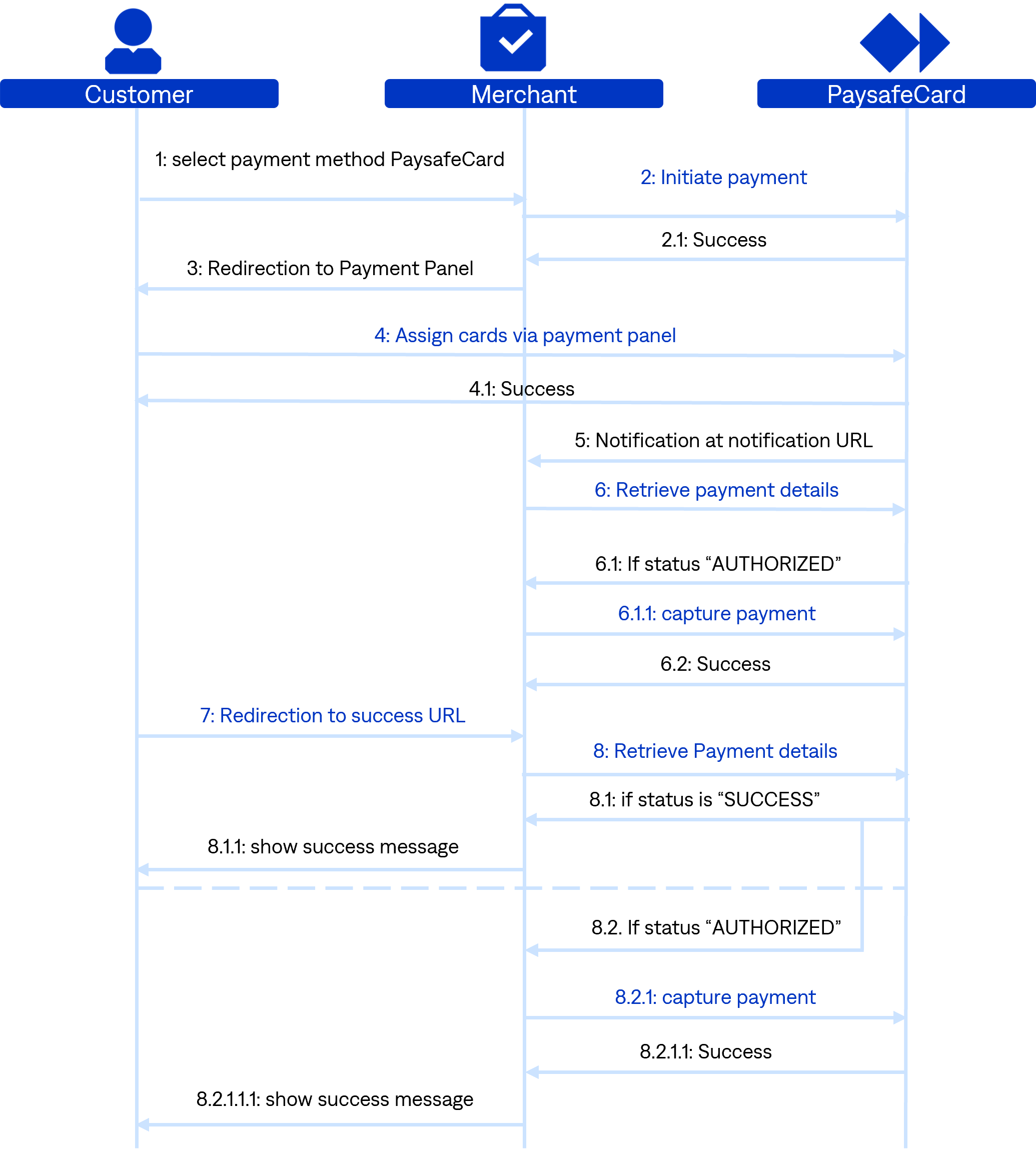
Payment Process
-
The customer selects the payment method PaysafeCard.
-
Initiate Payment: Send POST request
initiate Payment.- 2.1. If the response gives back http20x, redirect the customer to the payment panel.
- 2.2. If the response gives back http40x or htp50x, show an error message to the customer. Inititate Payment error message: "Transaction could not be intitiated due to connection problems. If the problem persists, please contact our (businessparter)support."
-
Redirection to the payment panel
auth_url: The customer reaches the payment panel. -
PIN entry(by customer): The customer enters a valid PIN and clicks pay.
- 4.1. Verification on PaysafeCard´s side if the entered PINs are valid. If the customer cancels the transaction on the payment panel, please show the following error message: "Transaction aborted by user"
-
Payment notification delivery: Since the card is assigned to the transaction(transaction status "AUTHORIZED"), we send a notification to your
notification_url. -
notification_urlhandling: Right after payment notification delivery you perform the GET requestRetrieve payment detailsto check the state of the transaction.- 6.1. If the GET request
retrieve payment detailsgets back the according status "AUTHORIZED", immediately perform the POST requestcapture Payment.- 6.2. If the response of
capture paymentis http20X and the status is "SUCCESS", make a user account top up.
- 6.2. If the response of
- 6.1. If the GET request
-
Redirection to the
success_url: We redirect the customer to yoursuccess_url. -
success_urlhandling: You check on thesuccess_urlwith the GET requestretrieve payment detailsthe state of the transaction.- 8.1. If the GET request
retrieve payment detailsgets back the status "SUCCESS“, show a success message to the customer. - 8.2. if the status is "AUTHORIZED", perform the POST request
capture Payment.- 8.2.1. If the response gives back http20X and the status is "SUCCESS", make a user account top up and show a success message to the customer.
- 8.2.2. If the response gives back http40X or http50X, show an error message to the customer.
- 8.3. if the response from
retrieve payment detailsgives back http40X or http50X, show an error message to the customer. Retrieve Payment Details error message: "The transaction could not be completed. This may have happened due to a temporary connection problem. Please press the "reload" button in your browser to retry completing your transaction. If the problem persists, please contact our (businesspartner)support.
- 8.1. If the GET request