Additional Payment Information
The sections below provide further information about the payment.
Payment Status
| One letter code | Meaning | Description |
|---|---|---|
| R | Created | The disposition has been successfully created. If nothing happens within 30 minutes, the disposition is transferred to state X by the PaysafeCard cleanup job. |
| S | Disposed | The customer successfully assigned a PIN to the transaction. The business partner can call executeDebit. |
| O | Consumed | executeDebit was successful, the money was correctly debited, and the transaction is closed. The business partner must mark the transaction as successful in their system. |
| L | Canceled | The disposition has been actively cancelled by the customer. |
| X | Expired | The time window for this disposition has ended, either before the customer entered a PIN or before executeDebit was called. |
Error Status Codes
All SOPG operations return an errorCode and a resultCode.
A resultCode can have one of the following values:
- 0: successful
- 1: logical problem
- 2: technical problem
In general, the following rules can be applied:
-
1 indicates that there is a problem with the submitted data, for example wrong credentials or an expired transaction. Retrying with the same request data will not be successful.
-
2 indicates a technical problem. This means the service is temporarily not available and the request can be retried.
Operation details and WSDL contract
Although the SOPG WSDL service contract includes more operations, all required operations for the basic payment process are described in this document.
All mandatory payment parameters are required. A transmission is obligatory even when the value remains NULL.
If the web service framework requires a WSDL at runtime, the SOPG WSDL from the WSDL URL must be downloaded and provided in the local environment.
The WSDL must not be fetched from PaysafeCard servers at runtime.
Command and Query Operations
The operations can be divided into query operations and command operations.
A command operation modifies the state of an object, while a query operation returns details about the current state of an object.
Command operations in SOPG are protected against unwanted side effects of repeated executions. For example, calling executeDebit twice on a transaction returns an error code on the second invocation.
Functions
createDisposition
-
Type: C
-
Description: The business partner initiates the payment process by sending a createDisposition request to PaysafeCard to create a disposition on the server. The maximum allowed amount is 1000.00 EUR or the equivalent in a different transaction currency.
-
Request Elements: username, password, mtid, subId, amount, currency, okUrl, nokUrl, merchantclientId, pnUrl, clientIp, shopId, shopLabel
-
Response Elements: mtid, subId, mid, resultCode, errorCode
getCustomerPanel
-
Type: C
-
Description: Allows the business partner to deliver the PaysafeCard payment panel application to the customer.
-
Request Elements: mid, mtid, amount, currency
-
Response Elements: -
executeDebit
-
Type: C
-
Description: Finishes the transaction by debiting money from the customer’s account after the customer paid at the Point of Sales. This step concludes the payment, as the close flag is mandatory to be set to 1. The business partner can keep the transaction open while the full amount is reserved until the end of the disposition time.
-
Request Elements: username, password, mtid, subId, amount, currency, close
-
Response Elements: mtid, subId, resultCode, errorCode
getSerialNumbers
-
Type: Q
-
Description: Gets the state of the disposition to verify the expected state before calling the next function.
-
Request Elements: username, password, mtid, subId, currency
-
Response Elements: mtid, subId, resultCode, errorCode, amount, currency, dispositionState, serialNumbers, paymentInstrument and paymentInstrumentSubtype only when enabled by PaysafeCard
getMID optional
-
Type: Q
-
Description: The business partner can query the assigned MID, which is the unique ID of the business partner, for the requested currency.
-
Request Elements: username, password, currency
-
Response Elements: currency, mid, resultCode, errorCode
Description of Parameters
-
username – business partner account username
- provided by PaysafeCard for authentication
-
password – business partner account password
- provided by PaysafeCard for authentication
-
mtid – transaction ID, unique identifier for each disposition
- maximum length: 60 characters
- recommended value: up to 20 characters
- provided by the business partner
- allowed characters: A-Z, a-z, 0-9, hyphen, and underline
- example: 3516-6s4dfsad41
-
subId – value must be left empty if nothing else is agreed
- also called reporting criteria
- offers the possibility to classify transactions
- maximum length: 8 characters, case sensitive
- agreement with PaysafeCard required
- example: shop1
-
amount – disposition amount
- requested amount must not exceed 1000.00 EUR or the equivalent in a different transaction currency
- maximum 11 digits before the decimal point
- exactly 2 digits after the decimal point
- use a point as a decimal separator
- valid examples:
- 100.00
- 1000.00
- invalid example:
- 1,000.00
-
currency – disposition currency
- maximum length: 3 characters, all uppercase
- ISO Currency Code
- example: EUR
-
pnUrl – payment notification URL at which PaysafeCard notifies the business partner as soon as an assignment was successfully performed
- more details are available in the Payment Notification chapter
- URL must be absolute and URL encoded because it is sent as a parameter
- maximum length: 765 characters
-
okUrl – URL to which customers are forwarded by PaysafeCard after clicking Back to Shop
- this URL should point to the merchant homepage or shopping basket
- make sure that the shopping basket is emptied as soon as the customer is redirected to the barcode application
- the business partner may include additional information in the URL
- URL must be absolute and URL encoded because it is sent as a parameter
- maximum length: 765 characters
-
nokUrl – URL to which customers are forwarded by PaysafeCard when they click the cancel button on the PaysafeCard barcode application
- URL must be absolute and URL encoded because it is sent as a parameter
- maximum length: 765 characters
It is crucial to send okUrl, nokUrl, and pnUrl in URL encoded form, also called percent encoding. Otherwise, the result may be an incorrect redirect of the customer to the confirmation page, in addition to a possible payment failure.
-
merchantclientId – identifies the customer on the business partner side
-
clientIp – IP address of the PaysafeCard customer
-
shopId – identification of the shop that originated the request
- most likely used by payment service providers acting as a proxy for other payment methods
- maximum length: 60 characters
- recommended value: up to 20 characters
- provided by the business partner
- allowed characters: A-Z, a-z, 0-9, hyphen, and underline
- example: 2568-B415rh_785
-
shopLabel – label or URL of the shop that originated the request, related to shopId
- most likely used by payment service providers acting as a proxy for other payment methods
- maximum length: 60 characters
- example: www.foodstore.com
-
mid – merchant ID, unique ID of the merchant and currency pair
- 10 digits long
- provided by PaysafeCard
- example: 1000001234
-
dispositionState – current state of the disposition
- see the Disposition states chapter for more details
-
serial number of assigned PaysafeCard – serial number assigned by PaysafeCard
- semicolon-separated details
- currency: ISO Currency Code
- disposition amount: amount customer paid for the transaction
- cardTypeId: PaysafeCard cards are grouped into card types, for example junior_PaysafeCard, adult_PaysafeCard, inhouse_PaysafeCard
- example: 0000000001200000;EUR;7.50;00002;
-
close – close flag of the disposition
- must be set to 1 in the executeDebit request
- by doing so, the transaction is closed and its status cannot be changed
-
resultCode – result code of the operation
- see the result codes chapter for details
-
errorCode – error code of the operation
- see the error codes chapter for details
-
dispositionRestrictions – restrictions set by the business partner to restrict a payment transaction according to individual needs
- multiple repeats possible
- each restriction consists of a key and a value
- key: the key of the restriction
- value: the value of the restriction
-
paymentInstrument – payment method used
- possible values: paysafecard, paysafecash, giftcard, pagoefectivo, safetypay
-
paymentInstrumentSubtype – subtype of the payment method used
- possible values:
- giftcard: cvspharmacy, dollargeneral, openbuckscard
- safetypay and pagoefectivo: cash or online
- PaysafeCard: code or account
- possible values:
Customer ID
Also known as Merchant Client ID, the customer ID is an important parameter for the integration of PaysafeCard.
The Customer ID identifies the customer on the business partner side.
The most optimal merchantclientId is a completely random value. The value should uniquely identify the customer and must be disconnected from any personal information.
This merchantclientId value should be the same for all transactions of the customer.
Here are guidelines for possible Customer IDs.
Valid Values
| Value | Type |
|---|---|
| 2c3be0b50c7a5f1964a63d78f38a6ffc41c027e9 | SHA1 - test@123.com |
| 742f2b1a55cd5d606ea44b4fcb54646a | MD5 - test@123.com |
| 3a5b0d0777dead9df93d502df85c8180e53804eb | SHA1 - UsernameValue1 |
| 3192481752123 | Random Customer Identifier |
| CustomerID1 | Customer Identifier free of personal information |
Invalid Values
- test@123.com
- Username_1
- FirstName123
- LastName123
- Timestamp
- IP Address
Please note that sending any form of the invalid values will not be accepted.
Importance of the Customer ID parameter
Please refer to #customer-id to view valid values for the merchantclientId parameter.
Background and explanation of the MCID
On one MID/RC combination, for example MID 10000000098 and RC NULL, we expect one customer to have only one MCID.
The MCID identifies a customer on the business partner side.
On the PaysafeCard side, the following logic is used:
- Transactions
2,3,4, and so on, using one MCID imply one customer using the same merchant account for all of these transactions. - Transactions
2,3,4, and so on, using2,3,4, and so on MCIDs imply separate customers using distinct merchant accounts for these transactions.
Important
PaysafeCard expects a correct representation of the customer accounts used on the business partner side.
Every recurring merchant customer using the same account must have the same MCID as when they last requested a payout.
For example:
- Merchant Account X must always use MCID X for every transaction initiated or requested from Merchant Account X.
- Merchant Account Y must always use MCID Y for every transaction initiated or requested from Merchant Account Y.
- Merchant Account Z must always use MCID Z for all transactions made with Account Z.
Every new merchant customer must have a new MCID.
What does this mean for payouts and refunds?
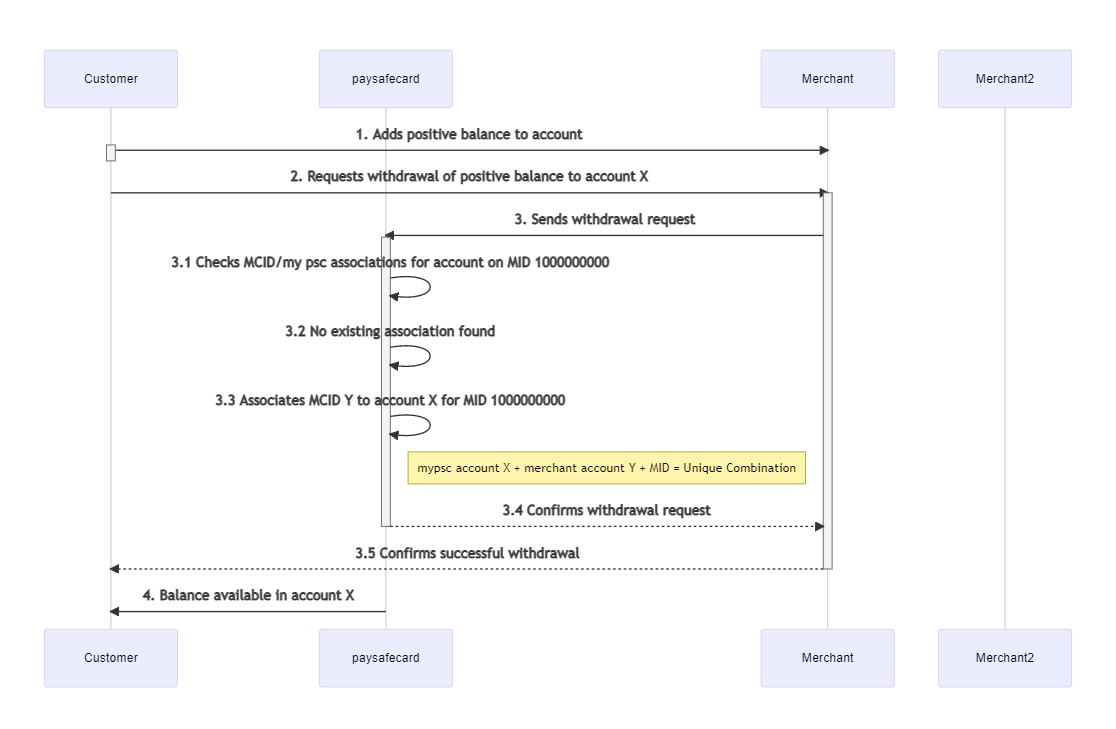
The first payout or refund establishes an association between the MCID and the PaysafeCard account.
All subsequent payouts on the same MID/RC combination must be performed with the same association going forward.
Using the example above, every payout or refund by Merchant Account X must be requested by MCID X. MCID X is then associated to PaysafeCard account X.
The association is also enforced in the other direction from this point on. Every payout or refund requested by MCID X must be requested for PaysafeCard account X.
MCID error flows
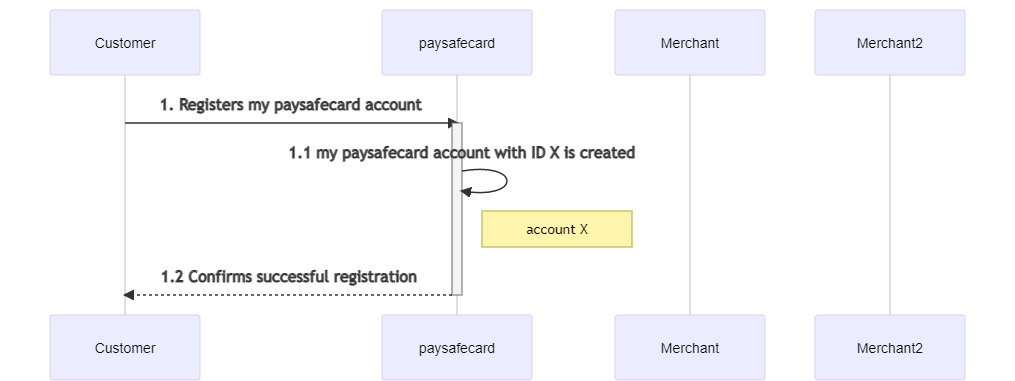
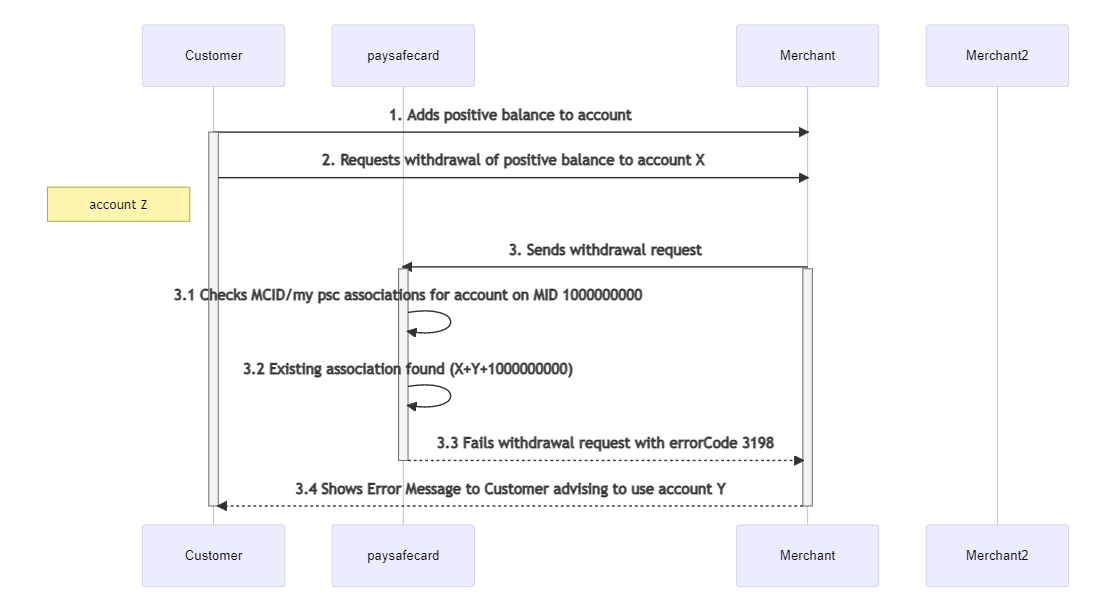
Customer creates PaysafeCard Account X
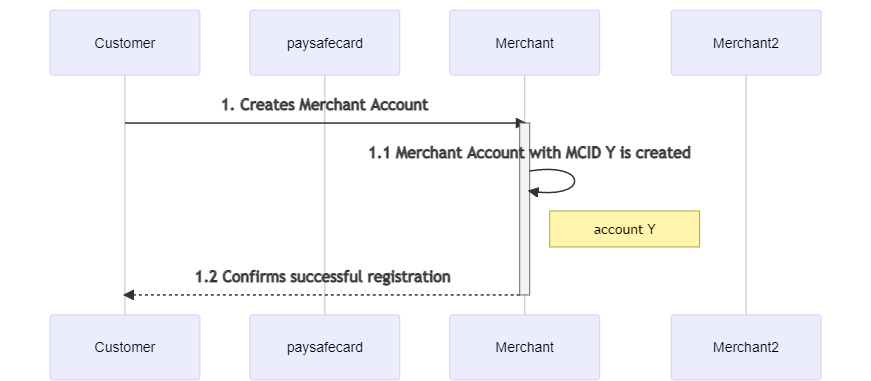
Customer creates Merchant Account Y
Customer requests withdrawal of Merchant Account Y to PaysafeCard Account X
Customer creates Merchant Account Z
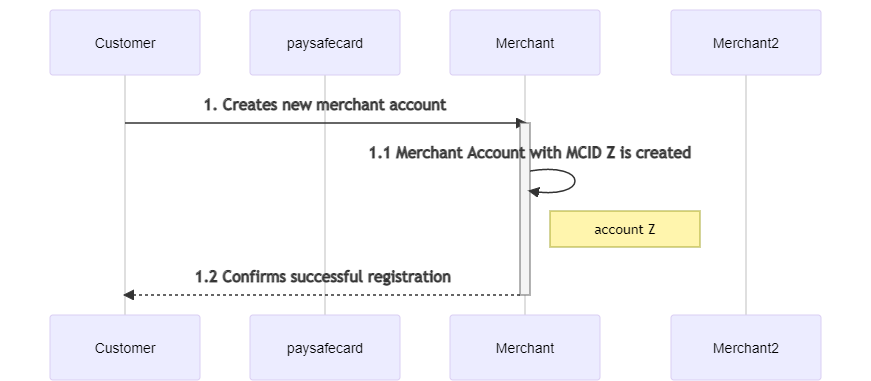
Customer requests withdrawal of Merchant Account Z to their PaysafeCard Account X
In this example, the withdrawal fails because the MCID does not match the previously used MCID for the PaysafeCard account.
| Code | Number | HTTP Status | Description |
|---|---|---|---|
There is already the maximum number of pay-out merchant clients assigned to this account | 3198 | 400 | The MCID does not match with the previously used MCID for that PaysafeCard account. Only a 1:1 relationship is allowed for MCID and PaysafeCard account. Refer to the #background-and-explanation-of-the-mcid section for more information. |
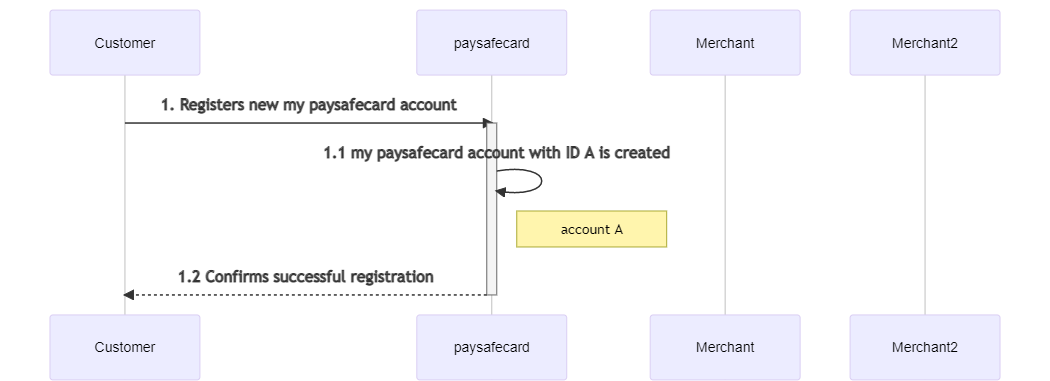
Customer creates PaysafeCard Account A
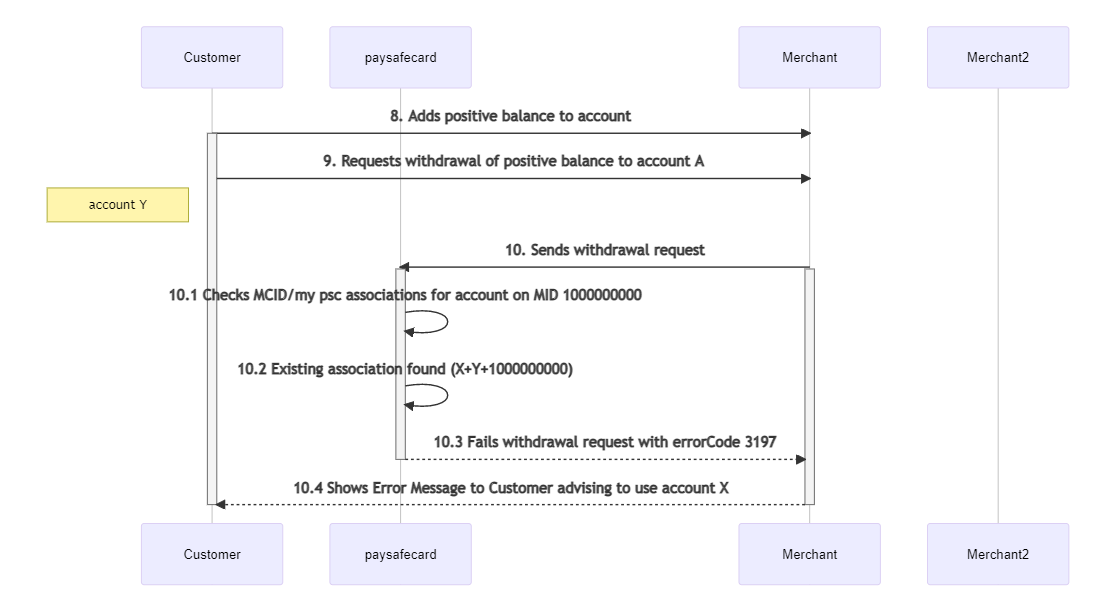
Customer requests withdrawal of Merchant Account Y to their PaysafeCard Account A
In this example, the withdrawal fails because the PaysafeCard account does not match the previously used PaysafeCard account for the MCID.
| Code | Number | HTTP Status | Description |
|---|---|---|---|
There is already the maximum number of pay-out accounts assigned to this merchantClient | 3197 | 400 | The PaysafeCard account does not match the previously used PaysafeCard account for that MCID. Only a 1:1 relationship is allowed for MCID and PaysafeCard account. Refer to the #background-and-explanation-of-the-mcid section for more information. |
Reporting Criteria
Reporting Criteria offers the possibility to classify sub-merchants. The setup must be agreed with PaysafeCard. Values that have not been agreed lead to a failed payment.
Reporting Criteria adds an additional layer to a MID and allows a logical separation of brands and merchants on PaysafeCard's side.
| Parameter | Description | Format |
|---|---|---|
| subId | The Reporting Criteria, or subId, is used to classify sub-merchants. The setup of RCs must be agreed with PaysafeCard. | Up to 8 alphanumeric characters |
When integrating as a Payment Service Provider, payments will be processed on behalf of merchants. In this case, this parameter is mandatory.
The parameter must be included in all PaysafeCard payment, payout, and refund requests for Payment Service Providers.
If you intend to process PaysafeCard transactions on multiple brands, please inquire about the possibilities of separating multiple entities for your account.
Disposition Time Windows
There are two time windows:
-
Payment expiration window:
Each initiated transaction remains in statusR(CREATED) for 30 minutes. If the transaction does not receive a valid PaysafeCard PIN, the transaction is set toX(EXPIRED) and has therefore expired. -
Disposition time window:
Once a disposition is in statusS(DISPOSED), the business partner must carry out the debit according to their settings. Fundamentally, the disposition time window is 60 seconds.In consultation with the PaysafeCard integration team, this setting can be changed anywhere up to 10 minutes, according to the T&Cs.
If this time frame is exceeded, the disposition will automatically expire, and the amount will be available again on the customer's PaysafeCard.
Furthermore, all dispositions that have been created but not successfully debited will be set to
EXPIRED.
These jobs are only active on the PaysafeCard production server. On the test system, transactions and reserved amounts in the S (DISPOSED) state are committed until the transaction completes with executeDebit.
Customer product introduction
This section provides an overview of the PaysafeCard customer products relevant in the context of the PaysafeCard SOPG API.
PaysafeCard account
PaysafeCard account gives customers the possibility to pay safely online without a bank account or credit card.
The customer buys PaysafeCard at a point of sales in the form of a printout with a 16-digit PIN and pays by entering the PIN in the PaysafeCard payment window on your webshop.
PaysafeCard account and administration tool
Aside from paying with a PIN, PaysafeCard also offers users a PaysafeCard account or an administration tool for the customer's PINs.
The customer signs up for a PaysafeCard account and tops up the account or adds the purchased PaysafeCard PINs to the administration tool.
The combined value of all PaysafeCard PINs added to a PaysafeCard account is then at the customer's disposal. Payments are made simply and safely by entering the username and password.
The PaysafeCard account administration tool is an alternative to the classic PaysafeCard account and is only available in Australia, Canada, Lithuania, Mexico, New Zealand, and Uruguay.
The PaysafeCard account administration tool cannot be used for payout or refund.
Payment page details
PaysafeCard customers are, by default, redirected to the hosted payment page of PaysafeCard, where they enter the 16-digit voucher code or log in with their account or administration tool to proceed with the payment.
Make sure that the hosted payment page size is correctly set in your webshop.
The PaysafeCard account administration tool is an alternative to the classic PaysafeCard account and is only available in Australia, Canada, Lithuania, Mexico, New Zealand, and Uruguay.
The PaysafeCard account administration tool cannot be used for payout or refund.
Integration on desktop devices
The PaysafeCard hosted payment page can be presented in a popup window or, alternatively, in an iframe.
Always allow vertical scrolling or dynamic sizing.
- Width: 600px
- Height: maximum 840px
Integration on mobile devices
The PaysafeCard payment page is optimized automatically for mobile devices.
If a customer is using a device with a resolution smaller than 600px, a payment panel optimized for mobile devices will be automatically shown.
This is also the case if the embedded iframe has a width smaller than 600px.
Language and locale settings
The language and locale of the payment panel are determined by the following rule:
-
Has the customer already visited the payment panel? Take the locale from the set cookie.
-
Take the locale from the IP address of the customer. PaysafeCard uses a GeoIP service check.
-
Take the value from the
localeparameter. -
Take the value from the
languageparameter. -
Take the locale from the browser header.
Payment Restrictions
Country restrictions
| Key | Example value | Possible values | Description |
|---|---|---|---|
| COUNTRY | DE | ISO 3166-1 codes | Restricts the processing of payments to Germany only. The value accepts ISO 3166-1 country codes. |
Please transmit a country code, ISO 3166-1, using the createDisposition API request to restrict payments to the specified country.
Do not define a country restriction in the createDisposition API request, COUNTRY, during the integration test in the Merchant Service Center. The integration test uses only one card type, AT_Classic.
Account restrictions
| Key | Example value | Possible values | Description |
|---|---|---|---|
| MIN_AGE | 18 | Positive integer value | Restricts PaysafeCard account holders to only those aged 18 years or older. |
| MIN_KYC_LEVEL | FULL | SIMPLE or FULL | Restricts PaysafeCard account holders to only those of a given status. |
PaysafeCard error messages
Translated PaysafeCard error messages for customers in EN, DE, ES, FR, IT, NL, SV, CZ, and PL can be found here:
paysafecard error messages