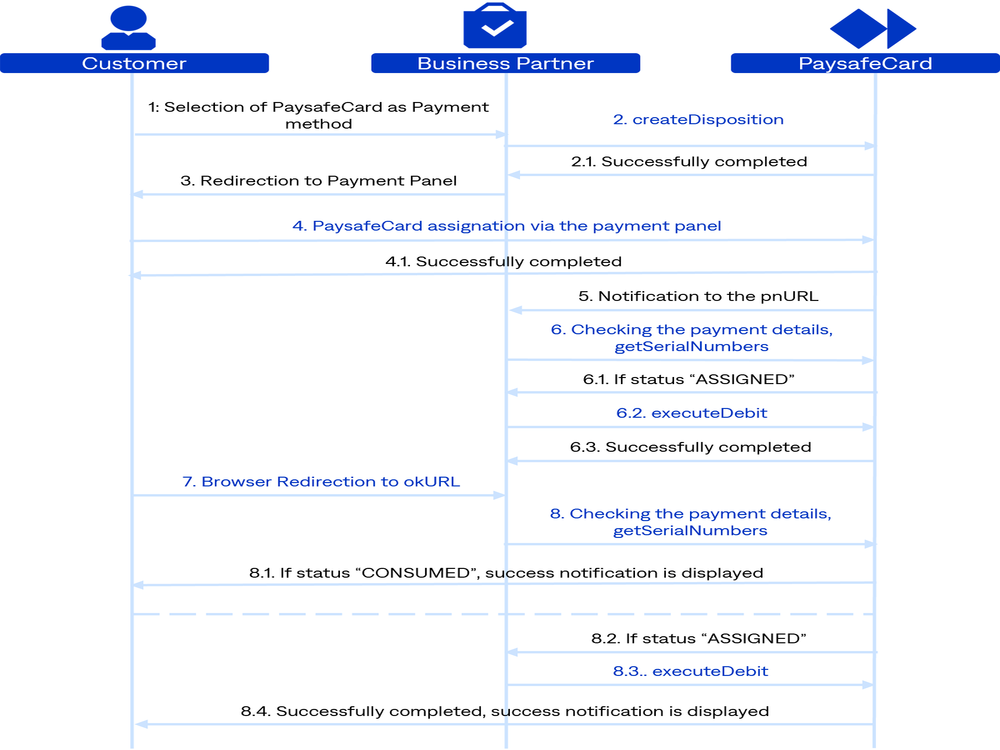
Payment Process
-
The customer selects the payment method PaysafeCard.
-
Initiate Payment: Send POST request
createDisposition.-
2.1. If the response gives back
http20x, redirect the customer to the payment panel. -
2.2. If the response gives back
http40xorhttp50x, show an error message to the customer.Initiate Payment error message:
Transaction could not be initiated due to connection problems. If the problem persists, please contact our business partner support.
-
-
Redirection to the payment panel
getCustomerPanel: The customer reaches the payment panel. -
PIN entry by customer: The customer enters a valid PIN and clicks pay.
-
4.1. Verification is performed on PaysafeCard's side to confirm whether the entered PINs are valid. If the customer cancels the transaction on the payment panel, show the following error message:
Transaction aborted by user
-
-
Payment notification delivery: Since the card is assigned to the transaction, transaction status
S, PaysafeCard sends a notification to yourpnUrl. -
pnUrlhandling: Right after payment notification delivery, perform the GET requestgetSerialNumbersto check the state of the transaction.-
6.1. If the GET request
getSerialNumbersreturns the corresponding statusS, immediately perform the POST requestexecuteDebit. -
6.2. If the response of
executeDebitishttp20X, theresultCodeis0, and theerrorCodeis0, make a user account top up.
-
-
Redirection to the
okUrl: Redirect the customer to yourokUrl. -
okUrlhandling: Query the state of the transaction with the GET requestgetSerialNumbersonce the customer lands on theokUrl.-
8.1. If the GET request
getSerialNumbersreturns the statusO, show a success message to the customer. -
8.2. If the status is
S, perform the POST requestexecuteDebit.-
8.2.1. If the response gives back
http20X, theresultCodeis0, and theerrorCodeis0, make a user account top up and show a success message to the customer. -
8.2.2. If the response gives back
http40Xorhttp50X, and/orresult/errorCode != 0, show an error message to the customer.
-
-
8.3. If the response from
getSerialNumbersgives backhttp40Xorhttp50X, show an error message to the customer.Retrieve Payment Details error message:
The transaction could not be completed. This may have happened due to a temporary connection problem. Please press the reload button in your browser to retry completing your transaction. If the problem persists, please contact our business partner support.
-