Additional PaysafeCard Features
Below, you will find a description of additional features that can be implemented alongside the integration of the payment transaction.
PaysafeCard Payout
Payout allows the transfer of funds to PaysafeCard account holders.
Payout is executed by the business partner at the demand of the customer. Payout is only available for PaysafeCard account holders in the following countries:
Austria, Belgium, Bulgaria, Croatia, Cyprus, Czech Republic, Denmark, Finland, France, Georgia, Germany, Greece, Hungary, Ireland, Italy, Latvia, Luxembourg, Malta, Netherlands, Norway, Poland, Portugal, Romania, Slovakia, Slovenia, Spain, Sweden, Switzerland, and United Kingdom.
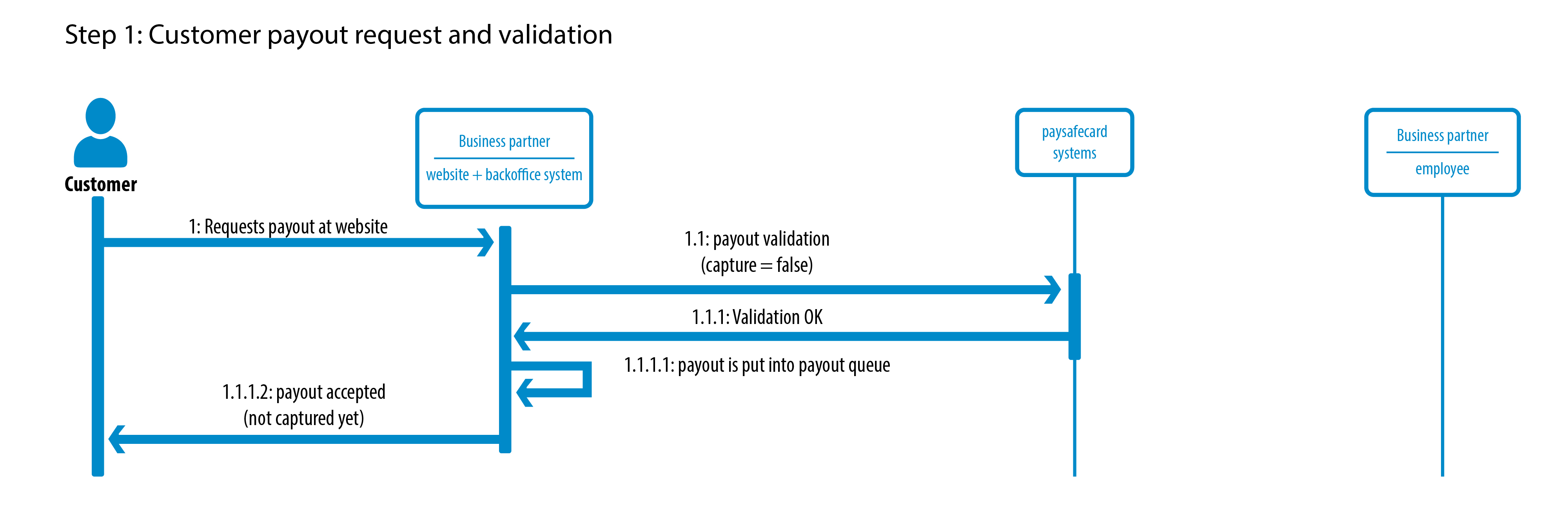
Step 1: Customer payout request and validation
- On the website of the business partner, the customer requests a payout.
1.1. The payout request is validated with the PaysafeCard system in real time. No money is transferred at this stage.
1.1.1. PaysafeCard validates the request, for example whether the payout can take place and whether the customer exists.
1.1.1.1. The merchant puts the payout request in the back office queue to be approved manually later.
1.1.1.2. The customer is informed that the request is accepted and the payout is pending, or is refused because the validation failed.
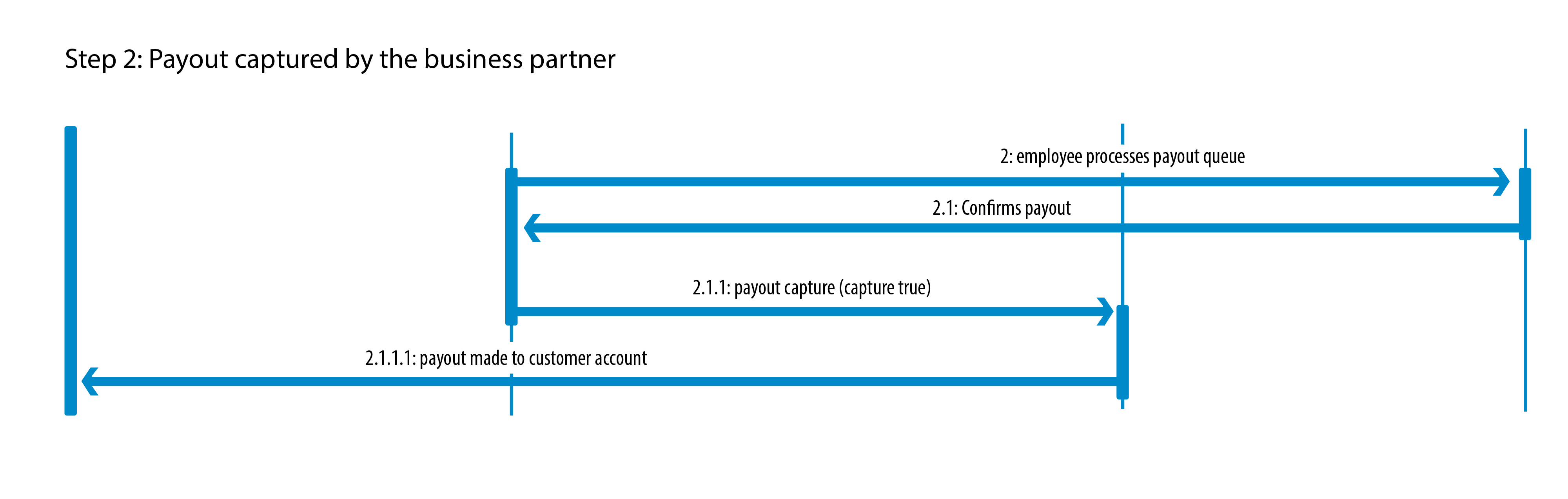
Step 2: Payout capture by the business partner
- The back office employee at the business partner manually approves the payout request from the queue.
2.1. The employee confirms the payout, or rejects it.
2.1.1. The business partner captures the payout.
2.1.1.1. PaysafeCard transfers the money to the customer PaysafeCard account.
Exchange of customer data
-
For each payout request, the business partner needs to provide the customer’s personal details, such as first name, last name, and date of birth, to PaysafeCard during the payout call.
The customer’s first and last name must be provided in the original alphabet characters, for example Greek or Cyrillic alphabet.
PaysafeCard automatically validates the provided data against the registered PaysafeCard account data. The payout will be automatically refused if the data does not match.
-
If the data does not match 100%, the automatic validation cannot proceed and the payout will be refused automatically.
The input will be normalized by PaysafeCard before the comparison starts.
Getting the MID limits
-
The business partner has one MID for each currency. Each MID has its own payout limit, which represents the amount that can still be paid out by the merchant.
Information about the financial condition of a MID can be retrieved in real time through
getPayoutState.Automatically associated MIDs will be returned.
-
As soon as a MID limit is reached, payout on this MID is not possible for this time period.
-
This information is also available by logging in to the web interface for business partners, the merchant reporting tool or
MRT. -
The web interface will only return the payout state for the current MID and not for associated MIDs.
-
The payout report
-
For reconciliation purposes, the business partner can download a CSV file containing all possible information for payments and payouts.
This file is called the payout report.
The payout report can be downloaded in the
MRT.
Settlement
-
All payout transactions need to be paid by the business partner.
The total monthly payout amount is automatically deducted, or netted, from the monthly payment amount.
-
The total amount of payout money may exceed the total amount of payment money up to a certain level.
-
Detailed information on this level can be retrieved with the function
getPayoutState.
Payout implementation
Prerequisites
-
SOPG username and password for request authentication are provided by PaysafeCard.
The user has functions for payment and refund available.
-
Authorization of the payment server IP address is required in the production environment.
If a
403error is received when trying to access the service, it is likely that the IP address is not yet allowed to access the system. -
Content-Type must be set in the HTTP header when submitting requests:
application/xml -
Character encoding must be
UTF-8. -
The business partner received a PaysafeCard account for testing purposes.
Interface guidelines
-
How the PaysafeCard payout implementation should ideally look from a customer perspective is documented in the interface guidelines document.
-
It is obligatory to implement all required error messages shown in the interface guidelines document.
Description of Parameters
username
Business partner account username.
- Provided by PaysafeCard for authentication.
password
Business partner account password.
- Provided by PaysafeCard for authentication.
ptid
Transaction ID, unique identifier for each disposition.
- Must be unique, also if the transaction failed.
- Must be different from the
mtidused during payment. - Maximum length: 90 characters.
- Recommended value: up to 20 characters.
- Provided by the business partner.
- Allowed characters:
A-Z,a-z,0-9,-hyphen, and_underline. - Example:
3516-6s4dfsad41
subId
Mandatory parameter for PSPs, payment service providers, to distinguish multiple websites.
- Value must be left empty if nothing else is agreed.
- Also called reporting criteria.
- Offers the possibility to classify transactions.
- Maximum length: 8 characters, case sensitive.
- Agreement with PaysafeCard is required.
- Example:
shop1
amount
Payout amount.
- Requested amount is not allowed to exceed
2500.00 EUR, or the equivalent in a different transaction currency. - Maximum 11 digits before the decimal point.
- Exactly 2 digits after the decimal point.
- Use a point as a decimal separator.
Valid examples:
100.00
1000.00
Invalid example:
1,000.00
currency
Disposition currency.
- Maximum length: 3 characters, all uppercase.
- ISO Currency Code.
- Example:
EUR
customerIdType
Used method for identification of the PaysafeCard account.
- Fixed value:
EMAILorCUSTOMERID
customerId
Related value to customerIdType.
- Maximum length: 90 characters.
- The PaysafeCard email address or account ID of the customer.
merchantclientID
A unique end customer identifier, meaning the unique ID of the end customer as registered in the merchant’s database.
- MCID.
- Maximum length: 50 characters.
- Example: hashed values, random customer identifier.
- After a successful payout, every additional payout request requires the same
merchantclientIDand PaysafeCard combination.
ValidationOnly
Validates the payout without transferring the funds.
- Value
true: test payout request for validity. - Value
false: execute payout.
utcOffset
The difference in hours and minutes from Coordinated Universal Time, UTC.
- Example:
-03:00
firstName
Subelement of CustomerDetailsBasic. The first name of the customer.
- Example:
John - Maximum length: 40 characters.
lastName
Subelement of CustomerDetailsBasic. The last name of the customer.
- Example:
Do - Maximum length: 40 characters.
dateOfBirth
Subelement of CustomerDetailsBasic. The date of birth of the payout customer in YYYY-MM-DD format.
- Example:
1979-12-20
comment
Reason for the payout request.
- Maximum length: 90 characters.
- Allowed characters:
A-Z,a-z,0-9, as well as.,,,-,/,\,:,?,!,(,),+,&,_, and space. - Example:
payout winnings
resultCode
Type of error.
0indicates that no error occurred.1indicates that there is a problem with the submitted data, for example wrong credentials or an expired transaction.2means a technical problem and that the service is temporarily not available.
errorCode
The error that occurred.
0indicates that no error occurred.- Any other value indicates that an error occurred.
errorCodeDescription
Provides a detailed description of the error code.
NULLin case of no error.- In case of an error, a string value will be returned.
getPayoutState Parameters
MID
Merchant ID, unique ID of the merchant/currency pair.
- 10 digits long.
totalpayoutAmount
The total amount of payouts that were executed on this MID within the current billing cycle.
- Double value.
- Example:
50000,00
totalPaymentAmount
The total amount of payments that were executed on this MID within the current billing cycle in the currency of the MID.
- Double value.
- Example:
300000,00
creditLine
An extra payout credit line provided by PaysafeCard to support payout in case a MID is out of balance in the currency of the MID.
- Double value.
- Example:
5000,00
totalpayoutBalance
The total amount that can still be paid out this billing cycle in MID currency.
- Double value.
- Example:
10000,00
dailypayoutLimit
The maximum amount of money that can be paid out on this MID for the current day, 24 hours, in the currency of the MID.
This value is only available if configured by PaysafeCard.
- Double value if configured.
- Example:
0,00
dailypayoutAmount
The total amount that has been paid out on this MID today, in MID currency.
- Double value.
- Example:
5000,00
dailypayoutBalance
The total amount that can still be paid out on this MID today, in MID currency.
This value is only available if the dailypayoutLimit is configured.
- Double value.
- Example:
0,00
PaysafeCard Refund
A refund transaction always refers to a previous underlying PaysafeCard payment. For this reason, it is required that a payment has been processed before the refund can be processed.
The business partner can initiate the refund to the PaysafeCard customer. PaysafeCard will top up the requested refund amount in the customer's PaysafeCard account.
Pending Refunds
Refunds can also be initiated to an email address that does not yet have an associated PaysafeCard account.
In this scenario, the refund request is created in a PENDING state and remains in this state for up to 14 days.
To support this flow, an email is sent to the provided email address inviting the recipient to create a PaysafeCard account in order to receive the funds.
If an account is created with the specified email address within those 14 days, the refund is automatically processed and the funds are loaded onto the newly created account.
If no account is created within 14 days, the refund request expires and no funds are transferred.
In both cases, when the refund is initially created and when the refund is processed or expires, the business partner is notified via the notification URL provided in the refund request.
To support Pending Refunds, the following additional parameters must be included in the refund request:
languagecountryCodenotificationUrl
Credit Limit
You cannot refund a higher amount than the amount you had in payments in one billing cycle.
To prevent failed refunds at the beginning of a billing cycle, it is possible to assign an additional credit limit to your account.
The duration of the billing cycle is defined in the contract.
Settlement
All successful refunds will be deducted from the payments, also called netting, on the monthly invoice that PaysafeCard sends to its business partners.
Description of Parameters
-
Type: C
-
Description: Top up the customer's PaysafeCard account with the given amount and currency.
-
Request Elements:
username,password,rtid,mtid,amount,currency,validateOnly,utcOffset,merchantclientid,customerIdTypeoptional,customerIdoptional. -
Response Elements:
rtid,mtid,currency,amount,validationOnly,resultCode,errorCode,errorCodeDescription.
username
Business partner account username.
- Provided by PaysafeCard for authentication.
password
Business partner account password.
- Provided by PaysafeCard for authentication.
rtid
Unique refund transaction ID.
- Maximum length: 60 characters.
- Provided by the business partner.
- Allowed characters:
A-Z,a-z,0-9, hyphen, and underline. - Example:
3516-6s4dfsad41
mtid
Transaction ID, unique identifier for each disposition.
- Maximum length: 60 characters.
- Recommended value: up to 20 characters.
- Provided by the business partner.
- Allowed characters:
A-Z,a-z,0-9, hyphen, and underline. - Example:
3516-6s4dfsad41
amount
Disposition amount.
- The requested amount must not exceed the amount of the original transaction.
- Maximum 11 digits before the decimal point.
- Exactly 2 digits after the decimal point.
- Use a point as a decimal separator.
- Example:
100.00
currency
Disposition currency.
- Maximum length: 3 characters, all uppercase.
- ISO Currency Code.
- Example:
EUR
validationOnly
This parameter should be set to 0, meaning false.
- Maximum length: 1 digit.
- Possible values:
1
utcOffset
The difference in hours and minutes from Coordinated Universal Time, UTC.
- Example:
-03:00
customerIdType
Used authentication method for identification of the PaysafeCard account.
- Possible values:
EMAIL,CUSTOMERID,PHONE - Normally set to
EMAIL
customerId
Related value to customerIdType.
- Maximum length: 90 characters.
- Can be a phone number, PaysafeCard account ID, or email address.
- Normally an email address.
merchantclientId
A unique end customer identifier. This is the unique ID of the end customer as registered in the business partner database.
If an email address is used, encrypt the value.
For promotional activities, PaysafeCard checks the clientId and avoids multiple redemptions.
- For security reasons, do not use the customer's registered username.
- Maximum length: 50 characters.
- Example:
client123
subId
Mandatory parameter for PSPs, meaning payment service providers, to distinguish multiple websites.
- Also called reporting criteria.
- Used to classify transactions.
- Maximum length: 8 characters, case sensitive.
- Agreement with PaysafeCard is required.
- Example:
webshop1
language
Language used to send the email in case of a Pending Refund.
countryCode
Country of the PaysafeCard account that needs to be created to receive the Pending Refund.
notificationUrl
URL to which PaysafeCard notifies the creation and completion of a Pending Refund.