Skrill 1-Tap Payment
Skrill offers a single-click payment service which enables you to automatically debit transactions from your customer's Skrill account without the customer having to log in to their account and authorise each time.
Customers are sent an email notification after each 1-Tap payment and they can view the status of all their Skrill 1-Tap payments in the History section of their Skrill Wallet account.
Customers can pay using Skrill 1-Tap with any of the following payment methods linked to their Skrill account:
- Credit/debit card (Visa and MasterCard)
- Skrill account balance
Enabling 1-Tap
To enable this service, contact merchantservices@skrill.com.
You must set up a separate merchant account for taking Skrill 1-Tap payments.
Enabling the MQI and API
You will need to enable the MQI (merchant query interface) and API (automated payment interface) and set up an MQI / API password to use 1-Tap.
To enable the MQI and / or API:
- Log in to your Skrill account at www.skrill.com.
- Go to Settings > Developer Settings.
- Check the Enable service checkbox next to the API and MQI
- Specify at least one IP address from which requests will be made. All requests from other IP addresses are denied. Access can be granted to:
- A single IP address (e.g., 192.168.0.2)
- Multiple IP addresses separated by space (e.g., 192.168.0.2 10.0.0.2)
- A subnet in CIDR notation (e.g., 175.10.10.252/30)
CIDR ranges should not be longer than 256 IP addresses.
If the Settings > Developer Settings section is not displayed in your account, contact merchantservices@skrill.com.
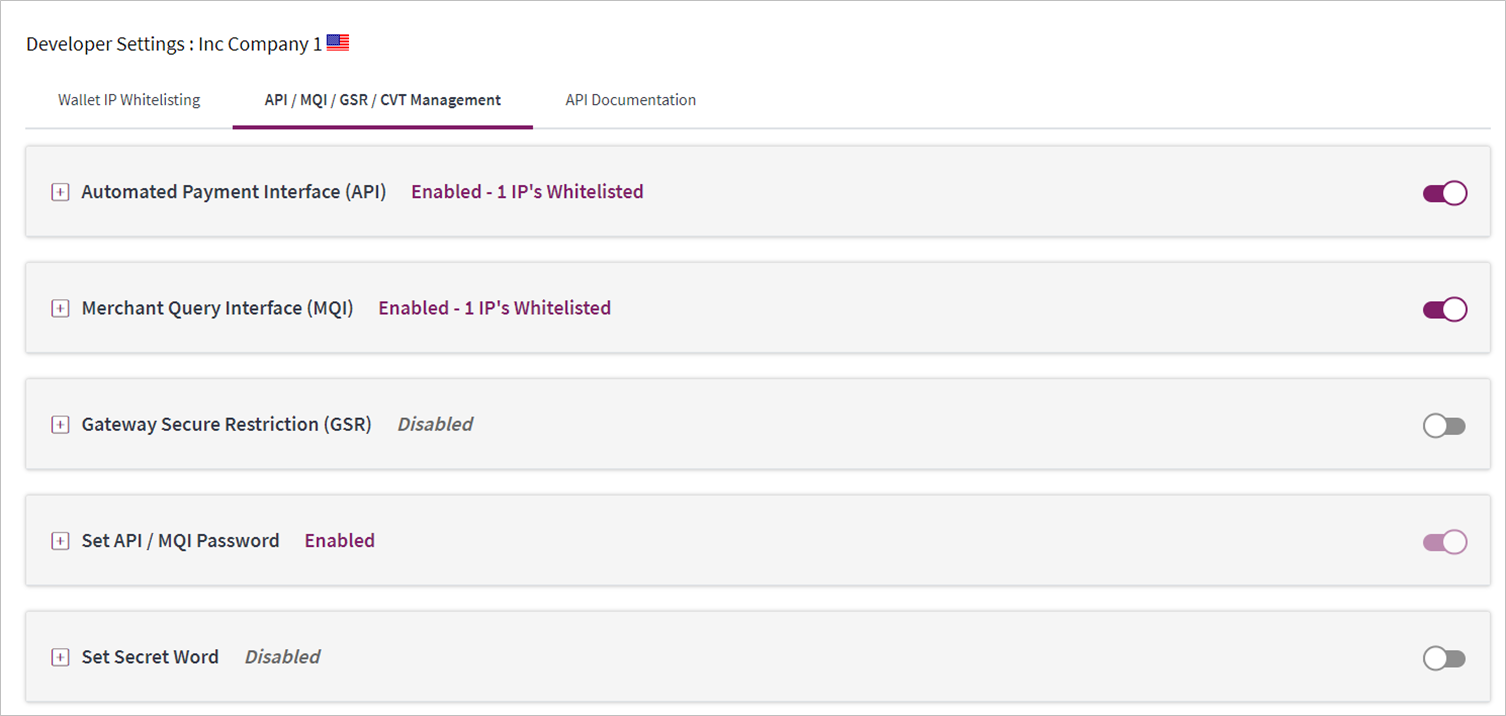
You must use a separate password for making API or MQI requests. This ensures that the password you use to access your Skrill Digital Wallet account can be changed without affecting the API or MQI.
To enable an API/MQI password:
- Locate the Settings > Developer Settings > Change MQI / API password area
- Enter a new password and confirm it in the Re-type password field below.
- To apply your changes, click Save. The MQI and API are now enabled.
The password must be at least 8 characters long and must contain at least one alphabetic and one non-alphabetic character.
The MQI is used for the following functions:
- Repost transaction status information for payment transactions (Wallet / Quick checkout payments and 1-Tap subsequent payments)
- View transaction status (payment and send money transactions)
- View account history
- Cancel a recurring payment
- View the status of a recurring payment
- Extend the end date of a recurring payment
- Cancel a 1-Tap payment
- View the status of a 1-Tap payment
The API is used for the following functions:
- Refund Quick Checkout / Wallet Checkout / 1-Tap payments. (This functionality is not available for Gambling and FOREX Merchants)
- Transfer Money to another Skrill Account (send money).
- Taking subsequent 1-Tap payments (after the initial setup payment)
Skrill 1-Tap button
The Skrill 1-Tap button must be displayed on your website when setting up Skrill 1-Tap mandates as well as with any subsequent transactions performed through Skrill 1-Tap.

This button is available in different sizes. For details, see:
https://www.skrill.com/en/business/merchants/brand-centre
Call flows
The figures below provide a description of the 1-Tap payment setup process.
Initial payment request with 1-Tap authorization
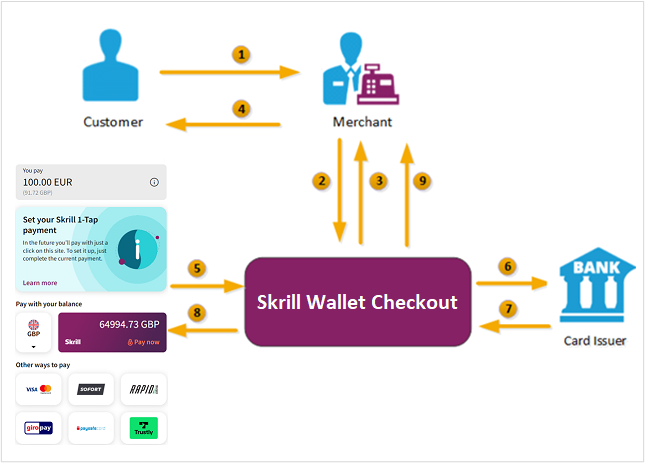
- When the customer is ready to pay for goods or services on your website, they select the Skrill 1-Tap button on your website.
- You request a session identifier (SID) by passing customer and transaction details (e.g., amount, currency, and language) to the Skrill Wallet Checkout. You also include the required 1-Tap parameters.
- Skrill returns the generated SID.
- Using a Lightbox, redirect the customer to the Skrill Wallet Checkout and include the session identifier in the redirect URL. Skrill displays the payment page.
Note: We do not support iframes. - The customer logs in to their account where they can view the 1-Tap transaction details, select a 1-Tap payment method, and confirm the transaction.
- Skrill requests authorisation for the payment from the customer's bank, third party provider or card issuer.
- The bank/provider approves or rejects the transaction.
- Skrill displays the confirmation page, containing the transaction result, on the Skrill Wallet Checkout.
- Skrill provides you with an asynchronous notification, sent to your status URL or IPN (instant Payment Notification), confirming the transaction details and status. These details include the rec_payment_id of the 1-Tap payment, which can be used for future 1-Tap debits from the customer's account.
You should keep track of the status of 1-Tap payment and update your records if notified of a status change at the ondemand_status_url you submitted for the 1-Tap payment.
Subsequent 1-Tap payments
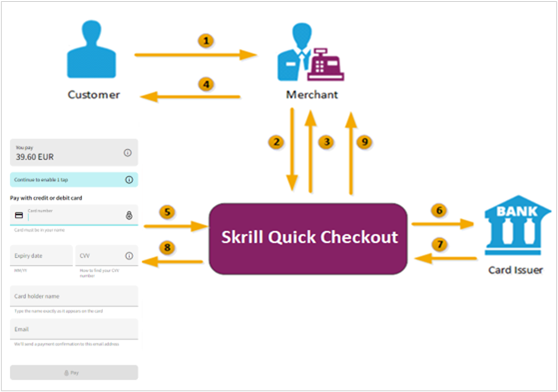
- The customer clicks the Skrill 1-Tap button.
- The merchant checks the status of the 1-Tap mandate in their records or through the Merchant Query Interface (MQI).
- If the customer is already set up for 1-Tap, the merchant makes the Prepare request. Both
frn_trn_idandrec_payment_idshould be provided.
If the customer is not set up for 1-Tap, then the merchant makes a normal Wallet Checkout payment request and optionally submits 1-Tap payment details to set up the 1-Tap service, as described previously in Figure.
- The Skrill 1-Tap Payment Interface returns the session identifier (SID).
- The merchant sends the execution request with the returned SID.
- The Skrill 1-Tap Payment Interface validates the request.
- Skrill requests authorisation for the payment from the customer's bank, third party provider or card issuer (if required).
- The bank/provider approves or rejects the transaction.
- The Skrill 1-Tap Payment interface sends a response with the transaction status.
- Transaction status notification is also posted to the merchant's status URL.
- The merchant notifies the customer of the status of the 1-Tap payment.
Setting up an initial 1-Tap payment
In addition to the standard parameters described in Parameters to be posted to the Skrill payment gateway, you can supply the following parameters to set up a Skrill 1-Tap payment via the Skrill Wallet Checkout:
Skrill 1-Tap parameters
| Field Name | Description | Required | Max Length | Example Value |
|---|---|---|---|---|
ondemand_max_amount | Maximum amount for future payments that will be debited from the customer's account | Yes | 9 | 11.50 |
ondemand_max_currency | 3-letter code of the currency of the maximum amount according to ISO 4217 | Yes / No | 3 | EUR |
ondemand_note | Text shown to the customer in the payment confirmation email as the reason for the Skrill 1-Tap payment | No | 1000 | credit topped up |
ondemand_status_url | URL to which Skrill notifies you that the Skrill 1-Tap payment is cancelled. Restricted to same ports as status_url | No | 400 | http://www.example.com/od_payment_cancelled.htm |
ondemand_status_url2 | Second URL to which Skrill notifies you that the Skrill 1-Tap payment is cancelled. Restricted to same ports as status_url | No | 400 | http://www.example.com/od_payment_cancelled2.htm |
- If
ondemand_max_currencyis not provided, the currency value will be the one provided as thecurrencyin the standard HTML form (see Parameters to be posted to the Skrill payment gateway). - A session identifier (SID) parameter is returned upon success.
- The Skrill response includes a
rec_payment_id. You should store therec_payment_idfield so that you can reference the original 1-tap transaction. - You can track the status of any 1-tap transaction and perform refunds using your own unique
transaction_idfor that transaction.
Example of a Skrill 1-Tap payment form
<form action="https://pay.skrill.com" method="post" target="_blank">
  <input type="hidden" name="pay_to_email" value="demowallet@sun-fish.com">
  <input type="hidden" name="status_url" value="https://www.example.com/status">
  <input type="hidden" name="language" value="EN">
  <input type="hidden" name="amount" value="39.60">
  <input type="hidden" name="currency" value="GBP">
  <input type="hidden" name="detail1_description" value="Description:">
  <input type="hidden" name="detail1_text" value="Romeo and Juliet">
  <input type="hidden" name="recipient_description" value="ACME Solutions">
  <input type="hidden" name="ondemand_max_amount" value="150.00">
    <input type="hidden" name="ondemand_max_currency" value="EUR">
    <input type="hidden" name="ondemand_note" value="Your 1-Tap Payment">
    <input type="hidden" name="ondemand_status_url"
      value="www.example.com/ondemandstatus1">
    <input type="hidden" name="ondemand_status_url2"
      value="www.example.com/ondemandstatus2">
  <input type="submit" value="Pay!">
</form>
Customer setup experience
The following image shows an example of the customer's view before they log in to their Skrill account to pay and activate 1-Tap for subsequent payments. Note that a 1-Tap information bar is shown at the top of the standard payment form to keep customers always informed. Customers can click the icon in the bar to see further information. Once they have logged in, they are prompted to choose a payment method for this and future 1-Tap payments.
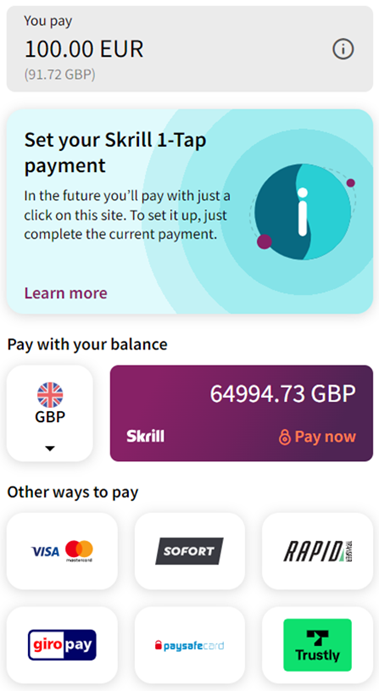
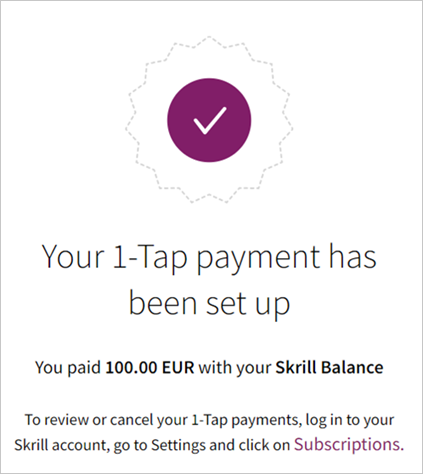
A successful payment with a message to inform the customer that 1-Tap is now setup for future payments:
Taking subsequent 1-Tap payments
Once a Skrill 1-Tap payment has been set up, you must use the Skrill 1-Tap Payment Interface (part of Skrill's Automated Payment Interface) to make individual requests to debit the customer's Skrill account. If you have provided a status_url value in your HTML form, Skrill will post the transaction details of each payment to that URL.
Connecting to the 1-Tap interface
You can connect to the Skrill 1-Tap interface by sending HTTPS GET / POST requests to:
https://www.skrill.com/app/ondemand_request.pl
- You must enable the Skrill Automated Payment Interface (API) and setup an MQI/API password
- Skrill recommend using POST for maximum security.
- Do not mix GET and POST requests. Choose which method to use and apply consistently.
- POST parameters are encoded using
Content-Type: application/x-www-form-urlencoded - GET parameters are encoded in the URI query string using & delimiters e.g., GET parameters are sent as part of the URL query string
https://www.skrill.com/app/query.pl?action=status_trn&email=mb654@abv.bg&password=53903d217504eb37f3fdb0ce77610558&mb_trn_id=104627261
Taking subsequent 1-Tap Payments is a two-step process:
- Send a first request with action set to prepare to receive a session id for step 2
- Send a second request with action set to request using the session id from step 1 to execute the payment
These steps are described in more detail next.
Prepare payment step
Action parameter: action=prepare
This action prepares the transaction that will be executed later using the request action. The following parameters are required:
| Field Name | Description | Required | Example Value |
|---|---|---|---|
email | The email address linked to your Skrill account | Yes | Info@example.com |
password | The lowercase hex MD5 of your API/MQI password | Yes | 9f535b6ae672f627e4e5f79f2b7c63fe |
action | The required action (i.e., prepare) | Yes | prepare |
amount | Amount of the request for a debit transaction | Yes | 10.50 |
currency | 3-letter code of the currency you wish to debit according to ISO 4217 | Yes | EUR |
ondemand_note | Text shown to the customer in the confirmation email as the reason for the Skrill 1-Tap payment | No | Credit topped up |
frn_trn_id | Your transaction ID, used for the payment. This is your own unique reference for this transaction | Yes | A205220 |
rec_payment_id | Recurring payment ID (rec_payment_id value) sent to your status_url page when you created the Skrill 1-Tap payment | Yes | 200005 |
merchant_fields | A comma-separated list of field names that are passed back to your web server when the Skrill 1-Tap payment is confirmed (maximum 5 fields) | No | Field1, Field2 |
Field1 | An additional field you can include, containing your own unique parameters | No | Value1 |
Field2 | An additional field you can include, containing your own unique parameters |
- Both
frn_trn_idandrec_payment_idshould be provided. You should use therec_payment_idfield to reference the original 1-Tap transaction and provide a uniquefrn_trn_idas the reference for the current transaction. - If
ondemand_noteis not provided, the one that is submitted when creating the Skrill 1-Tap payment will be used, if available. - A session identifier (SID) parameter is returned upon success.
You can track the status of any 1-Tap transaction and perform refunds using the unique frn_trn_id for that transaction.
Skrill response
Skrill returns an XML response to your prepare request which contains a 'response' tag with one of the following elements:
sidelement - returned if the authorisation and payment preparation is successful. The SID (Session Identifier) must be submitted in your transfer execution request.errorelement – included if an error occurs. It includes anerror_msgtag, which contains the error message description.
Example 1: Successful prepare request
Below is an example of a successful prepare request:
Request:
POST https://www.skrill.com/app/ondemand_request.pl
Header
Content-Type: application/x-www-form-urlencoded
Body
email=sample.merchant%40sun-fish.com&password=fb0dc09bd0989fe975afd3e4ddabb926&action=prepare&amount=1.23¤cy=EUR&ondemand_note=ondemand+note&frn_trn_id=12341990&rec_payment_id=1668618647
Response:
<?xml version="1.0" encoding="UTF-8"?>
<response>
<sid>4414c2a969c744c27bd674a0b0a5ba8a</sid>
</response>
Example 2: Failed prepare request
This example shows a request that failed, due to an invalid merchant email.
Request:
POST https://www.skrill.com/app/ondemand_request.pl
Header
Content-Type: application/x-www-form-urlencoded
Body
email=&password=fb0dc09bd0989fe975afd3e4ddabb926&action=prepare&amount=1.23¤cy=EUR&ondemand_note=ondemand+note&frn_trn_id=12341990&rec_payment_id=1668618647
Response:
<?xml version="1.0" encoding="UTF-8"?>
<response>
<error>
<error_msg>LOGIN_INVALID</error_msg>
</error>
</response>
General errors
| Error | Description |
|---|---|
SESSION_EXPIRED | Session has expired. Session IDs are only valid for 15 minutes |
Errors when making Skrill 1-Tap payment requests
| Error | Description |
|---|---|
CUSTOMER_IS_LOCKED | The customer's account is locked for outgoing payments |
BALANCE_NOT_ENOUGH | The customer's account balance is insufficient |
RECIPIENT_LIMIT_EXCEEDED | The customer's account limits are not sufficient |
CARD_FAILED | The customer's credit or debit card failed |
REQUEST_FAILED | Generic response for transaction failing for any other reason |
ONDEMAND_CANCELLED | The customer has cancelled this Skrill 1-Tap payment |
ONDEMAND_INVALID | The Skrill 1-Tap payment requested does not exist |
MAX_REQ_REACHED | Too many failed Skrill 1-Tap payment requests to the API. For security reasons, only two failed attempts per user per 24 hours are allowed |
MAX_AMOUNT_REACHED | The payment amount is greater than the maximum amount configured when 1-Tap payments were set up for this user |
Errors when validating parameters
| Error | Description |
|---|---|
INVALID_OR_MISSING_ACTION | Wrong action or no action is provided |
LOGIN_INVALID | Email address and/or password were not provided |
INVALID_REC_PAYMENT_ID | Invalid recurring payment ID is submitted by the merchant |
MISSING_EMAIL | Provide registered email address of merchant account |
MISSING_PASSWORD | Provide correct API/MQI password |
MISSING_AMOUNT | Provide amount you wish to send |
MISSING_CURRENCY | Provide currency you wish to send |
MISSING_BNF_EMAIL | Provide email address of the beneficiary |
MISSING_SUBJECT | Provide subject of the payment |
MISSING_NOTE | Provide notes for the payment |
Execute payment step
Action parameter: action=request
Now that you have received a session ID you can execute the actual payment transaction using the request action. The URL is the same as before. The following parameters are required:
| Field Name | Description | Required | Example Value |
|---|---|---|---|
sid | Session identifier returned in response to the prepare request | Yes | 7783bfa23641a627e4a5f79f2b7c6 |
action | The required action (i.e., request) | Yes | request |
Upon success, Skrill returns the details of the transaction as an XML response. This response contains the following fields:
| Field Name | Description | Example Value |
|---|---|---|
amount | Amount requested | 10.50 |
currency | 3-letter currency code of the amount, according to ISO 4217 | EUR |
id | Transaction ID | 500123 |
status | Skrill 1-Tap payment status: '2' – processed; '-2' – failed | 2 |
status_msg | Text description of the status | processed |
- If a request fails, you are not allowed to make more than two requests for a debit of a customer's account using a Skrill 1-Tap payment per customer per 24 hours.
- The customer is notified via email for every Skrill 1-Tap payment request executed.
Example 3: Successful prepare request
Below is an example of a successful request:
Request:
POST https://www.skrill.com/app/ondemand_request.pl
Header
Content-Type: application/x-www-form-urlencoded
Body
sid=84034fe3e5c9f6ef54e51efbbe9f2767&action=request
Response:
<?xml version="1.0" encoding="UTF-8"?>
<response>
<transaction>
<amount>10.34</amount>
<currency>EUR</currency>
<id>1668624876</id>
<status>2</status>
<status_msg>processed</status_msg>
</transaction>
</response>
Example 4: Failed request
This example shows a request that failed, due to an expired session id.
Request:
POST https://www.skrill.com/app/ondemand_request.pl
Header
Content-Type: application/x-www-form-urlencoded
Body
sid=123&action=request
Response:
<?xml version="1.0" encoding="UTF-8" ?>
<response>
<error>
<error_msg>SESSION_EXPIRED</error_msg>
</error>
</response>
Checking or cancelling 1-Tap payments
You can use the Merchant Query Interface (MQI) to review the status of a 1-Tap payment or to cancel it so that no more 1-Tap payments can be taken.
You can access the MQI by posting an HTTPS GET/POST query to:
https://www.skrill.com/app/query.pl
The MQI requires three general parameters to be included in your query (email, password, and action) and a few parameters specific to the requested action (see the additional parameter tables for each action below).
General parameters
| Field Name | Description | Required | Example Value |
|---|---|---|---|
email | The email address linked to your Skrill account | Yes | Info@example.com |
password | The lowercase hex MD5 of your API/MQI password | Yes | 9f535b6ae672f627e4e5f79f2b7c63fe |
action | The required action (e.g., status_od) | Yes | status_od |
amount | Amount of the request for a debit transaction | Yes | 10.50 |
Cancel Skrill 1-Tap payment
Action parameter: action=cancel_od
This action allows you to cancel a Skrill 1-Tap payment. The following additional parameter is required:
| Field Name | Description | Required | Example Value |
|---|---|---|---|
trn_id | Your transaction ID. This is the transaction_id value you provided for the initial setup 1-Tap payment. If you did not provide a transaction_id parameter, this will be the transaction_id parameter returned to your status_url page once the initial setup 1-Tap payment is complete | Yes | 500123 |
Request:
POST https://www.skrill.com/app/query.pl
Header
Content-Type: application/x-www-form-urlencoded
Body
action=cancel_od&email=info@example.com&password=9f535b6ae672f627e4a5f79f2b7c63fe&trn_id=500123
Response:
200 → → OK
Where an arrow symbolises a tab character.
Using Escape Sequences to represent special characters:
200\t\tOK\n\n
Get Skrill 1-Tap payment status
Action parameter: action=status_od
This action allows you to check the status of a Skrill 1-Tap payment. The following additional parameter is required.
| Field Name | Description | Required | Example Value |
|---|---|---|---|
trn_id | Your transaction ID. This is the transaction_id value you provided for the initial setup 1-Tap payment. If you did not provide a transaction_id parameter, this will be the transaction_id parameter returned to your status_url page once the initial setup 1-Tap payment is complete | Yes | 500123 |
If a transaction with the supplied ID is found, the response will contain the following parameters on the second line of the response:
- Status: 0 – active; -1 – cancelled
- Last execution date in
dd-mm-yyyyformat or -- if no subsequent payments have been taken (payments after the initial setup).
Example 5: Check status of a cancelled 1-Tap payment
Request:
POST https://www.skrill.com/app/query.pl
Header
Content-Type: application/x-www-form-urlencoded
Body
action=status_od&email=info@example.com&password=9f535b6ae672f627e4a5f79f2b7c63fe&trn_id=500123
Response:
200 →   →   OK
Status: -1 Last execution date: 08-01-2017
The arrows above represent tab characters. There are two spaces between the Status value and the word last.
Using Escape Sequences to represent special characters:
200\t\tOK\nStatus: -1 Last execution date: 08-01-2017\n
Example 6: Check status of an active 1-Tap payment with no subsequent payments
Request:
POST https://www.skrill.com/app/query.pl
Header
Content-Type: application/x-www-form-urlencoded
Body
action=status_od&email=info@example.com&password=9f535b6ae672f627e4a5f79f2b7c63fe&trn_id=500123
Response:
200 →   →   OK
Status: 0 Last execution date: --
Using Escape Sequences to represent special characters:
200\t\tOK\nStatus: -1 Last execution date: --\n
Example 7: Check status of an active 1-Tap payment with invalid transaction
Request:
POST https://www.skrill.com/app/query.pl
Header
Content-Type: application/x-www-form-urlencoded
Body
action=status_od&email=info@example.com&password=9f535b6ae672f627e4a5f79f2b7c63fe&trn_id=123
Response:
403 → → Transaction not found: 123
Using Escape Sequences to represent special characters:
403\t\tTransaction not found: 123\n
The above response still returns a 200 HTTP response status code
MQI error messages
The following error messages can be returned by the Merchant Query Interface:
| Error | Description | Reason for Error |
|---|---|---|
| 401 | Unauthorised / Cannot log in | Authentication is required and has failed or has not yet been provided. |
| 402 | Payment Required | Reserved for future use. |
| 403 | Forbidden | The request was valid, but the server is refusing to respond to it. For example, the provided credentials were successfully authenticated but do not grant permission to access the resource. |
| 404 | Not Found | The requested resource could not be found. |
| 405 | Method not Allowed | A request was made of a resource using a request method not supported. For example, using GET on a method which requires data to be presented via POST. |