Purchase Orders
Introduction
The Purchase Order service lets customers pay for an external order - created by an upstream partner system - directly from their Paysafe Embedded Wallet balance. The customer reaches the merchant application with a service code (for example a CIP code), the SDK resolves the order details, and the customer reviews and confirms the payment without leaving the host app.
Key Features
- Simulate a purchase order to check fees and validate purchase order details without creating an actual transaction.
- Perform necessary validations and initiate purchase order process.
- Confirm the operation and move it to the processing stage, finalizing the payment flow.
- Access a list of available purchase order methods for the customer.
Prerequisites
Before integrating the Purchase Order service, ensure you have:
- A valid Paysafe account with appropriate permissions.
- Set up instructions for Paysafe SDK Android or iOS.
To get started, initialize the PurchaseOrderService instance in your app as shown below:
- Kotlin
- Swift
import com.paysafe.wallet.android.core.wallet.Wallet

val purchaseOrderService = Wallet.getInstance().getPurchaseOrderService()
import PaysafeWallet

let purchaseOrderService = Wallet.instance.purchaseOrderService
Purchase Order Workflow Overview
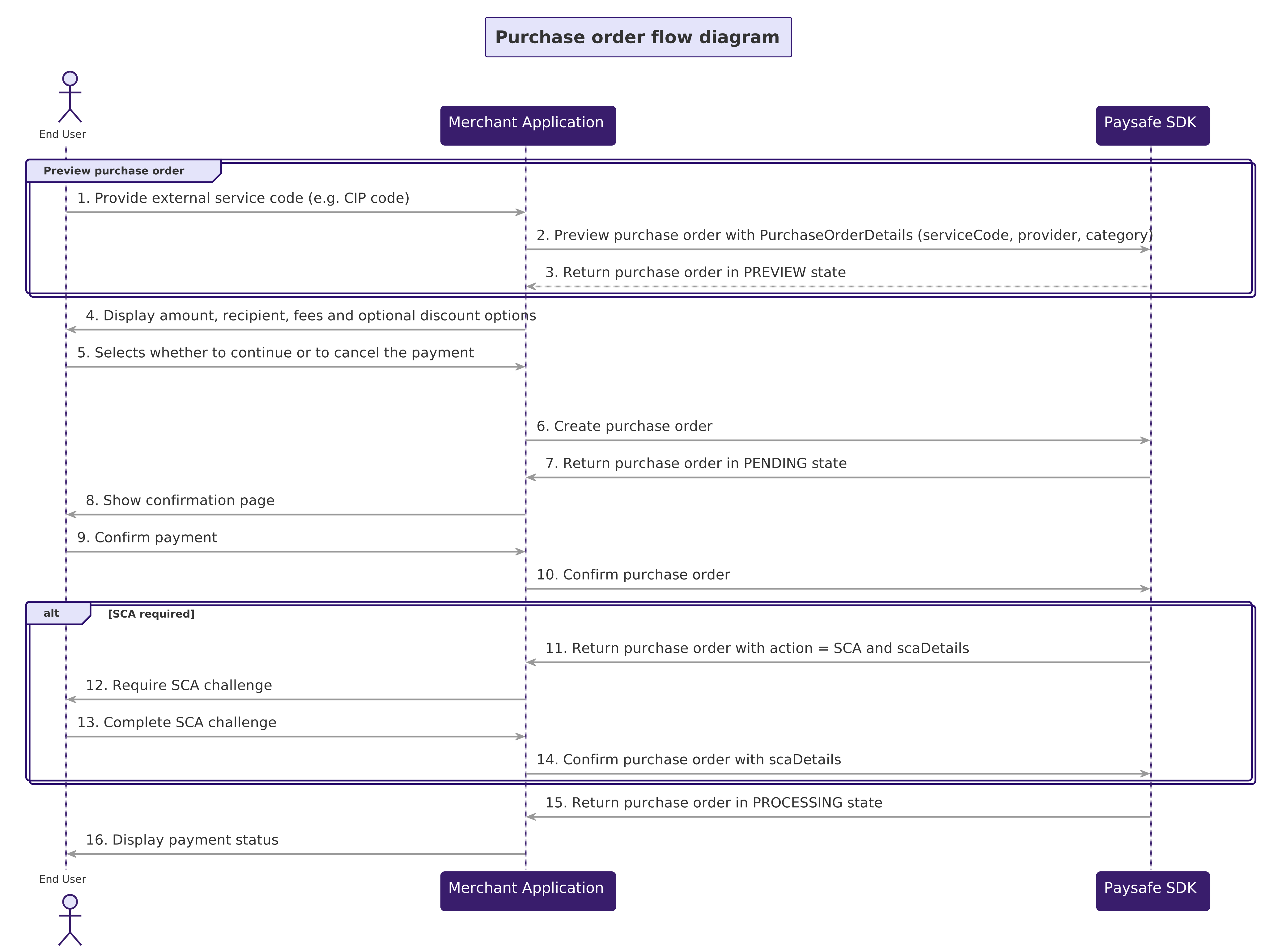
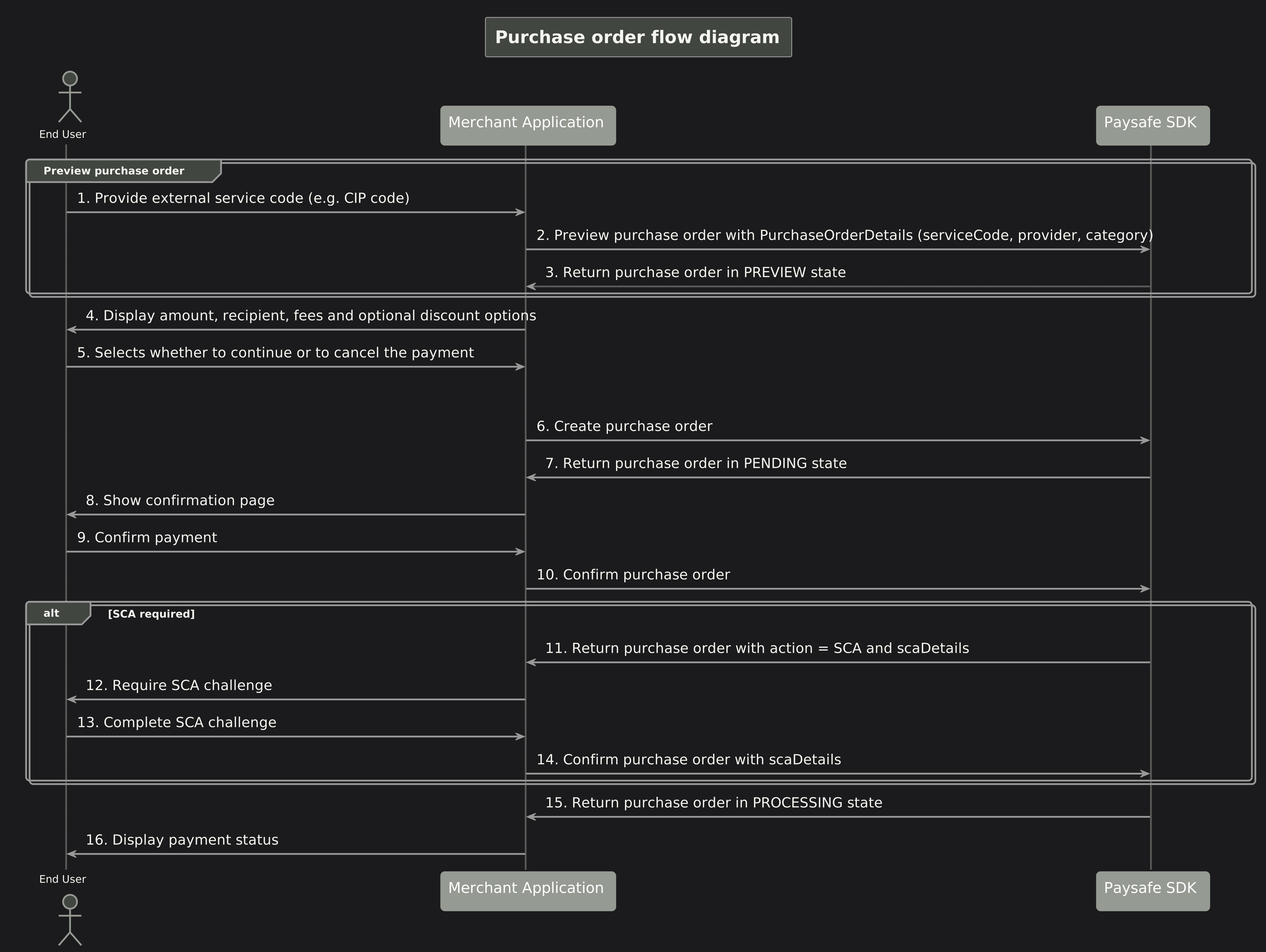
Purchase order steps
To complete purchase order, you will follow a three-step process: Validate the order details before creating the order. Lock in the order and prepare it for confirmation. Finalize and process the order payment.
1. Preview Purchase Order
The preview method is the first step in the purchase order process.
It allows you to validate the purchase order parameters before actually creating the purchase order.
This step creates a purchase order in PREVIEW state, which does not perform any transaction in the Paysafe Wallet system.
Instead, it checks the purchase order's configuration.
Purpose: Validate the external serviceCode against the supported provider
Outcome: A Purchase Order object is returned, which is needed for the next steps.
The secure code required for the request must be obtained in advance. The value of the secure code will vary depending on the provider.
- Kotlin
- Swift
val request = PurchaseOrderRequest(
    purchaseOrderDetails = PurchaseOrderDetails(
        serviceCode = "1A2B3C4D5E",
        provider = PurchaseOrderProvider.PAGO_EFECTIVO,
        category = PurchaseOrderCategory.PURCHASE,
        description = "Pedido en tienda en línea - referencia de compra #ORD-2026-88421"
    )
)

val purchaseOrderId: String
try {
    val preview = purchaseOrderService.preview(request)
    purchaseOrderId = preview.id
    // Display preview.amount, preview.currencyCode, preview.recipient, preview.fees to the customer
} catch (exception: Exception) {
    // Handle error (for example PARTNER_NOT_AUTHORIZED, CUSTOMER_NOT_AUTHORIZED, invalid serviceCode)
    return
}
let request = Wallet.PurchaseOrderRequest(
    purchaseOrderDetails: Wallet.PurchaseOrderDetails(
        serviceCode: "1A2B3C4D5E",
        provider: .pagoEfectivo,
        category: .purchase,
        description: "Pedido en tienda en línea - referencia de compra #ORD-2026-88421"
    )
)

purchaseOrderService.preview(request: request) { result in
    switch result {
    case .success(let preview):
        // Persist preview.id, then display preview.amount, preview.currencyCode,
        // preview.recipient, preview.fees and preview.discountDetails to the customer
    case .failure(let error):
        // Handle error (for example PARTNER_NOT_AUTHORIZED, CUSTOMER_NOT_AUTHORIZED, invalid serviceCode)
    }
}
2. Create Purchase Order
After the customer reviews the preview, call create to transition the purchase order from PREVIEW to PENDING.
The SDK runs the required validations and the response carries the final paymentFunding distribution.
Purpose: Perform all required validations.
Outcome: The purchase order moves to PENDING and is ready to be confirmed.
- Kotlin
- Swift
val createRequest = PurchaseOrderCreate(
    discounts = null,
    paymentProperties = null
)

try {
    val pending = purchaseOrderService.create(purchaseOrderId, createRequest)
    // pending.status == PaymentStatus.PENDING
    // pending.paymentFunding describes the wallet amount and applied discounts
} catch (exception: Exception) {
    // Handle error (for example PURCHASE_ORDER_PREVIEW_EXPIRED)
    return
}
let createRequest = Wallet.PurchaseOrderCreate(
    discounts: nil,
    paymentProperties: nil
)

purchaseOrderService.create(id: purchaseOrderId, create: createRequest) { result in
    switch result {
    case .success(let pending):
        // pending.status == .pending
        // pending.paymentFunding describes the wallet amount and applied discounts
    case .failure(let error):
        // Handle error (for example PURCHASE_ORDER_PREVIEW_EXPIRED)
    }
}
3. Confirm Purchase Order
Confirm moves the purchase order from PENDING to PROCESSING. The customer's wallet is
debited and the funds are routed to the external provider for settlement against the original
service code.
Purpose: Commit the payment and trigger downstream processing by the external provider.
Outcome: The purchase order transitions to PROCESSING. When SCA is required, the SDK returns
the purchase order with action = PaymentCompletionAction.SCA and scaDetails; the order stays
in PENDING until the SCA challenge has been completed and confirm is called again with the
scaDetails payload.
This operation might require Strong Customer Authentication (SCA).
Please read Strong Customer Authentication for more information on the process.
If the PurchaseOrder object returned by confirm has action: PaymentCompletionAction.SCA,
the scaDetails will contain the SCA authentication properties needed to complete the process.
Follow the steps outlined in Submit the SCA Authentication
to confirm the event. After the SCA event is accepted, invoke confirm method again,
providing scaDetails in the PurchaseOrderConfirm parameter.
- Kotlin
- Swift
val confirmRequest = PurchaseOrderConfirm(
    scaDetails = null,
    paymentProperties = null
)

runCatching {
    purchaseOrderService.confirm(purchaseOrderId, confirmRequest)
}.onSuccess { purchaseOrder ->
    purchaseOrder.scaDetails?.let { scaDetails ->
        // Solve the SCA challenge with these details
        // as described in https://docs.paysafe.com/docs/embedded-wallets/strong-customer-authentication
        // Repeat the confirm call once the SCA challenge is solved.

        val scaDetailsRequest = ScaAuthenticationEventRequest(
            eventId = scaDetails.eventId,
            walletOperationId = scaDetails.walletOperationId
        )

        purchaseOrderService.confirm(
            purchaseOrderId,
            PurchaseOrderConfirm(
                scaDetails = scaDetailsRequest,
                paymentProperties = null
            )
        )
    } ?: // No scaDetails - the purchase order is confirmed and now in PROCESSING
}.onFailure { exception ->
    // Handle error
}
let confirmRequest = Wallet.PurchaseOrderConfirm()

purchaseOrderService.confirm(id: purchaseOrderId, confirm: confirmRequest) { result in
    switch result {
    case .success(let purchaseOrder):
        if purchaseOrder.action == .sca, let scaDetails = purchaseOrder.scaDetails {
            // Solve the SCA challenge with these details
            // as described in https://docs.paysafe.com/docs/embedded-wallets/strong-customer-authentication
            // Repeat the confirm call once the SCA challenge is solved.
            let scaDetailsRequest = Wallet.SCAAuthenticationEventRequest(
                eventID: scaDetails.eventID,
                walletOperationID: scaDetails.walletOperationID
            )

            purchaseOrderService.confirm(
                id: purchaseOrderId,
                confirm: Wallet.PurchaseOrderConfirm(scaDetails: scaDetailsRequest)
            ) { _ in
                // Handle final result
            }
        } else {
            // Handle purchaseOrder - it is now in PROCESSING
        }
    case .failure(let error):
        // Handle error
    }
}
Additional Methods
In addition to the methods that drive a single purchase order through its lifecycle, the Purchase Order service exposes read methods for inspecting historical orders.
Get a Purchase Orders List
- Kotlin
- Swift
Use getAll method to retrieve a paginated list of purchase orders for the current customer by
passing the GetPurchaseOrdersParameters. Details about the object can be found
here.
If no parameters are passed, the last 10 purchase orders are returned by default.
val parameters = GetPurchaseOrdersParameters(
    limit = 10,
    offset = 0,
    merchantRefNum = "67ad4ce7-6a5e-4767-9936-e063b912cc1d",
    serviceCode = "1A2B3C4D5E",
    slipId = "5009964049",
    status = PaymentStatus.COMPLETED
)

try {
    val purchaseOrderList = purchaseOrderService.getAll(parameters)
    // purchaseOrderList.purchaseOrders and purchaseOrderList.meta (paging metadata)
} catch (exception: Exception) {
    // Handle error
}
Use getAll method to retrieve a paginated list of purchase orders for the current customer by
passing the GetPurchaseOrdersParameters.
If no parameters are passed, the last 10 purchase orders are returned by default.
let parameters = Wallet.GetPurchaseOrdersParameters(
    limit: 10,
    offset: 0,
    merchantRefNum: "67ad4ce7-6a5e-4767-9936-e063b912cc1d",
    serviceCode: "1A2B3C4D5E",
    slipID: "5009964049",
    status: .completed
)

purchaseOrderService.getAll(parameters: parameters) { result in
    switch result {
    case .success(let purchaseOrderList):
        // purchaseOrderList.purchaseOrders and purchaseOrderList.meta (paging metadata)
    case .failure(let error):
        // Handle error
    }
}
Get a Single Purchase Order
To retrieve the latest state of a specific purchase order.
- Kotlin
- Swift
val purchaseOrderId = "urn:purchase-order:7edd1e3b-e6e4-478a-942b-8c8ba6c06695"

try {
    val purchaseOrder = purchaseOrderService.get(purchaseOrderId)
} catch (exception: Exception) {
    // Handle error
}
let purchaseOrderID = "urn:purchase-order:7edd1e3b-e6e4-478a-942b-8c8ba6c06695"

purchaseOrderService.get(id: purchaseOrderID) { result in
    switch result {
    case .success(let purchaseOrder):
        // Handle purchaseOrder
    case .failure(let error):
        // Handle error
    }
}