Wallet Checkout
Introduction
Wallet Checkout enables customers to pay for goods and services directly from their Paysafe Embedded Wallet balance. Instead of entering card or bank details, the customer reviews the payment and confirms it within their mobile application. Funds are transferred from the customer's wallet to the merchant in a single, secure flow.
A checkout is built around an immutable session created by the merchant. The session captures everything about the purchase - amount, currency, items, and the merchant recipient. Session data can not be modified after creation; if anything needs to change, the merchant creates a new session. This keeps the payment flow predictable and auditable.
Key Features
- Retrieve checkout session details including amount, currency, items, and merchant information.
- Preview a payment to display fees, total cost, and the customer's balance after payment - before committing.
- Create and confirm payments with built-in support for Strong Customer Authentication (SCA).
- Cancel a payment at any point before confirmation.
Prerequisites
Before integrating the Wallet Checkout service, ensure you have:
- A valid Paysafe account with appropriate permissions.
- Set up instructions for Paysafe SDK Android or iOS.
To get started, initialize the WalletCheckoutService instance in your app as shown below:
- Kotlin
- Swift
import com.paysafe.wallet.android.core.wallet.Wallet

val walletCheckout = Wallet.getInstance().getWalletCheckoutService()
import PaysafeWallet

let walletCheckout = Wallet.instance.walletCheckoutService
Checkout Payment Workflow Overview
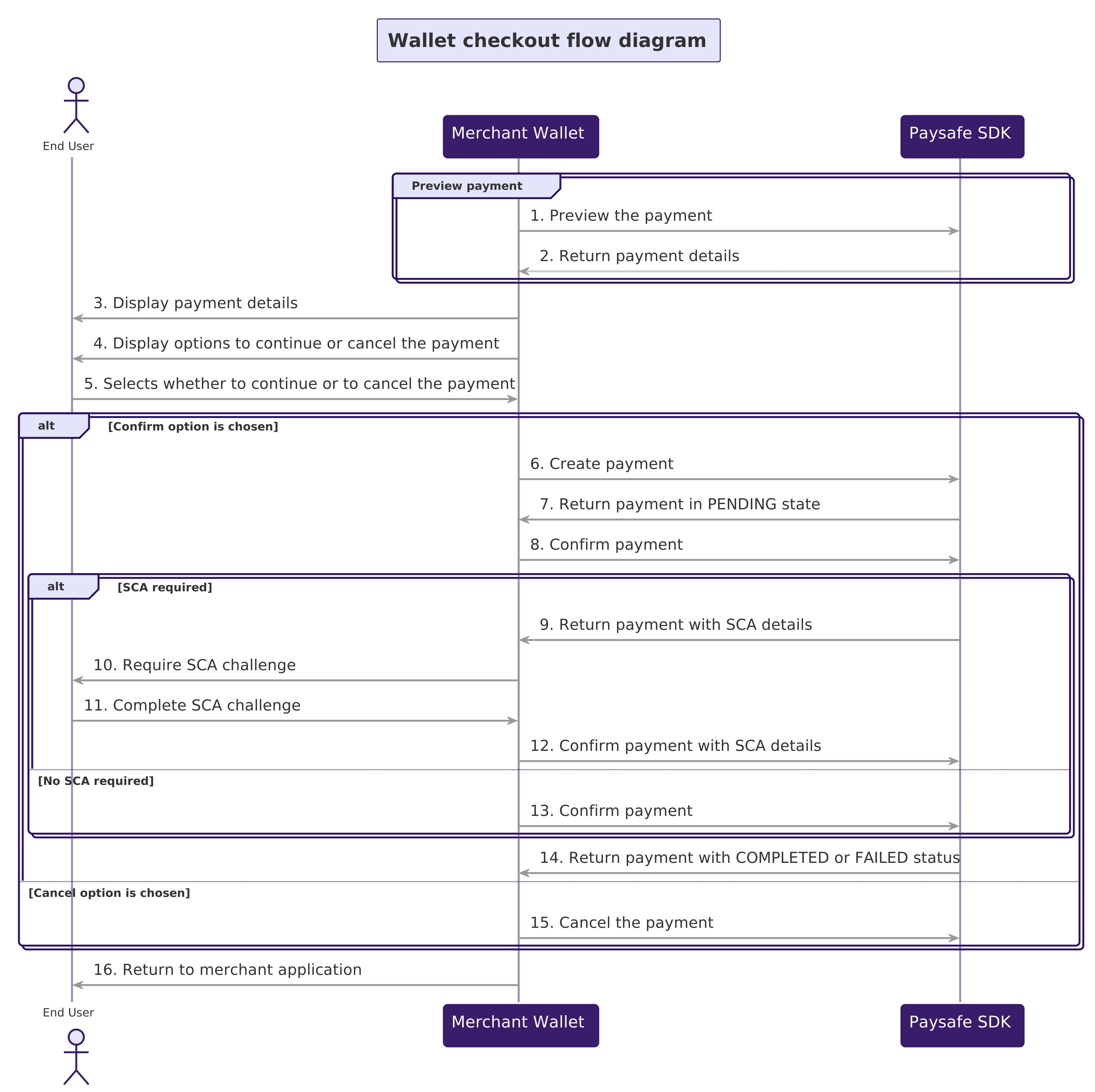
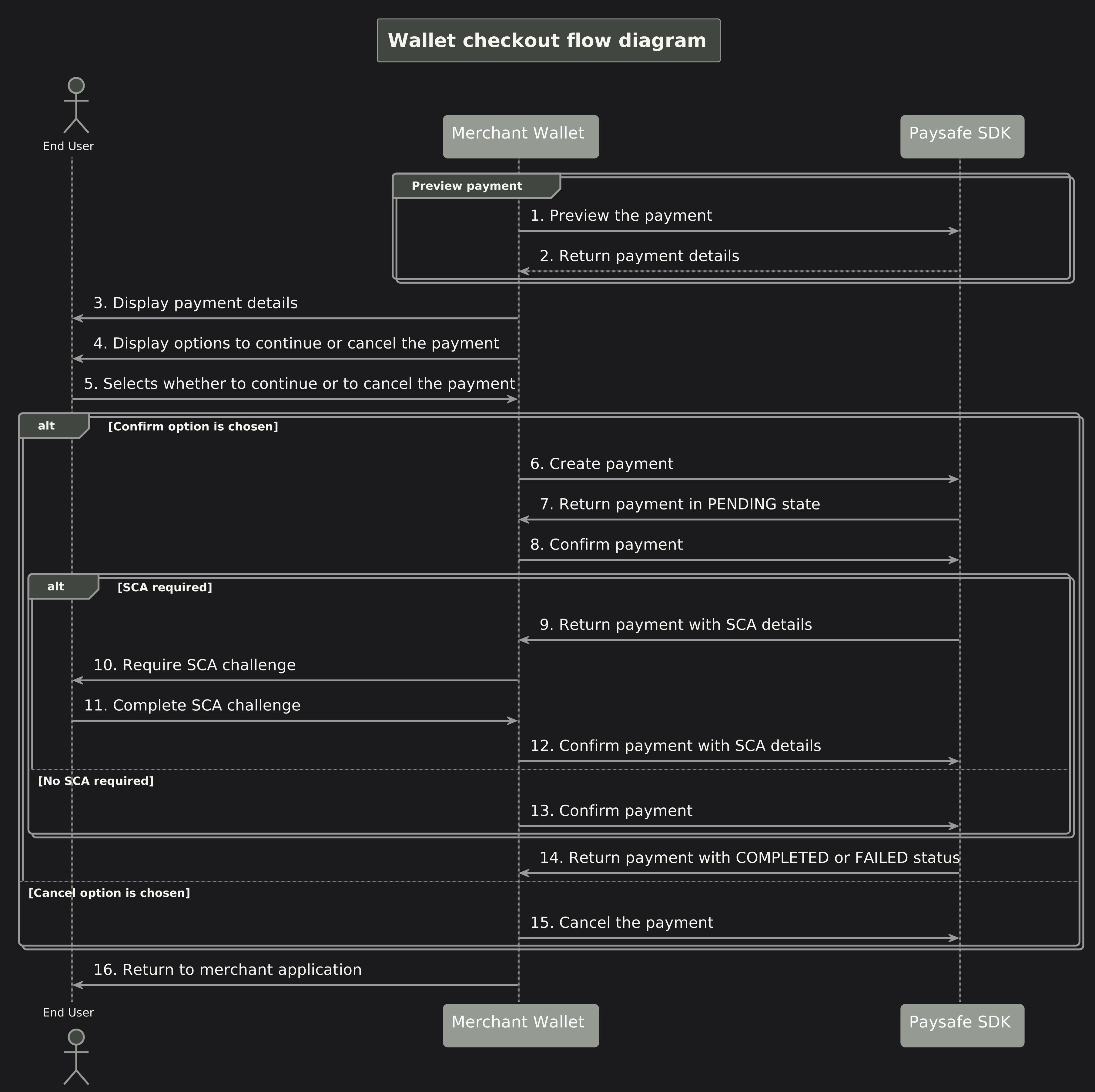
1. Get Session
Retrieves the current state and details of a checkout session by its ID from the customer's perspective.
The session contains information about the merchant, the requested payment amount, currency, items, and the session status.
A secureCode is required to authenticate the request.
- Kotlin
- Swift
val sessionId = "01KKVREY6PAWC2BNGCTSY91QG8"
val secureCode = "226a9c74e13d166d16e6ff843a3eb75f43ded3c0b9239b8ce0082a8315f3ca46"

val parameters = WalletCheckoutGetSessionParameters(secureCode = secureCode)

try {
    val session = walletCheckout.getSession(sessionId, parameters)
    // Handle session info - e.g. display amount, currency, items
} catch (exception: Exception) {
    // Handle error
}
let sessionID = "01KKVREY6PAWC2BNGCTSY91QG8"
let secureCode = "226a9c74e13d166d16e6ff843a3eb75f43ded3c0b9239b8ce0082a8315f3ca46"

let parameters = Wallet.WalletCheckoutGetSessionParameters(secureCode: secureCode)

walletCheckout.getSession(id: sessionID, parameters: parameters) { result in
    switch result {
    case .success(let session):
        // Handle session info - e.g. display amount, currency, lineItems
    case .failure(let error):
        // Handle error
    }
}
2. Checkout Payment Steps
To process a checkout payment, follow a three-step process: preview, create, and confirm. Each step transitions the payment through its lifecycle.
1. Preview Payment
The preview step creates a payment in PREVIEW status within the checkout session. This validates the payment parameters without committing to a transaction.
Purpose: To validate the payment parameters without processing a transaction.
Outcome: A WalletCheckoutPaymentResponse is returned containing the payment details.
The session must be in SENDER_BOUND status before a payment can be previewed.
2. Create Payment
Once the payment has been previewed, the create step transitions it to PENDING status. All necessary validations are performed, and the system prepares the payment for processing.
Purpose: To perform required validations and transition the payment into a state where it is ready for confirmation.
Outcome: The payment is now in PENDING status, fully validated and ready for the confirmation step.
3. Confirm Payment
After the payment has been created, the confirm step transitions it to PROCESSING status. This step supports optional SCA (Strong Customer Authentication) details for regulatory compliance.
Purpose: To confirm the payment and initiate actual processing.
Outcome: The payment moves to PROCESSING status.
This operation might require Strong Customer Authentication (SCA).
Please read Strong Customer Authentication for more information.
If the response contains scaDetails, follow the steps in Handle Strong Customer Authentication
to complete the challenge, then call confirmPayment again providing the scaDetails parameter.
- Kotlin
- Swift
val sessionId = "01KKVREY6PAWC2BNGCTSY91QG8"
val secureCode = "226a9c74e13d166d16e6ff843a3eb75f43ded3c0b9239b8ce0082a8315f3ca46"

// Step 1 - Preview.

val previewRequest = WalletCheckoutPaymentPreview(
    id = sessionId,
    secureCode = secureCode
)

try {
    val previewResponse = walletCheckout.previewPayment(previewRequest)
    // Display the payment preview to the customer
} catch (exception: Exception) {
    // Handle error
    return
}

// Step 2 - Create.

val createRequest = WalletCheckoutPaymentCreate(
    id = sessionId,
    secureCode = secureCode
)

try {
    walletCheckout.createPayment(createRequest)
} catch (exception: Exception) {
    // Handle error
    return
}

// Step 3 - Confirm.

val confirmRequest = WalletCheckoutPaymentConfirm(
    id = sessionId,
    secureCode = secureCode,
    scaDetails = null
)

try {
    val confirmResponse = walletCheckout.confirmPayment(confirmRequest)
    // Handle successful payment confirmation
} catch (exception: Exception) {
    // Handle error
    return
}

// Redirect customer back to returnUrl
let sessionID = "01KKVREY6PAWC2BNGCTSY91QG8"
let secureCode = "226a9c74e13d166d16e6ff843a3eb75f43ded3c0b9239b8ce0082a8315f3ca46"

// Step 1 - Preview.

let previewRequest = Wallet.WalletCheckoutPaymentPayment(
    id: sessionID,
    secureCode: secureCode
)

walletCheckout.previewPayment(request: previewRequest) { result in
    switch result {
    case .success(let previewResponse):
        // Display the payment preview to the customer
    case .failure(let error):
        // Handle error
    }
}

// Step 2 - Create.

let createRequest = Wallet.WalletCheckoutPaymentCreate(
    id: sessionID,
    secureCode: secureCode
)

walletCheckout.createPayment(request: createRequest) { result in
    switch result {
    case .success(let createResponse):
        // Handle successful payment creation
    case .failure(let error):
        // Handle error
    }
}

// Step 3 - Confirm.

let confirmRequest = Wallet.WalletCheckoutPaymentConfirm(
    id: sessionID,
    secureCode: secureCode
)

walletCheckout.confirmPayment(request: confirmRequest) { result in
    switch result {
    case .success(let confirmResponse):
        // Handle successful payment confirmation
    case .failure(let error):
        // Handle error
    }
}

// Redirect customer back to confirmResponse.returnURL
Cancel Payment
Transitions an existing payment within a checkout session to CANCELLED status. Use this to allow customers to abort the checkout process before confirmation.
- Kotlin
- Swift
val cancelRequest = WalletCheckoutPaymentCancel(
    id = sessionId,
    secureCode = secureCode
)

try {
    val cancelResponse = walletCheckout.cancelPayment(cancelRequest)
    // Handle successful cancellation
} catch (exception: Exception) {
    // Handle error
}
let cancelRequest = Wallet.WalletCheckoutPaymentCancel(
    id: sessionID,
    secureCode: secureCode
)

walletCheckout.cancelPayment(request: cancelRequest) { result in
    switch result {
    case .success(let cancelResponse):
        // Handle successful cancellation
    case .failure(let error):
        // Handle error
    }
}