Executing transactions on behalf of the customer
The following scenarios can be implemented:
- One‑Click Payments (Customer‑Initiated Payments)
- Subscriptions or Recurring Payments (Merchant‑Initiated Payments)
For both scenarios, an initiate_payment request must be made, including the additional payment_token parameter.
If the provided payment token is valid and the customer has sufficient funds in their PaysafeCard account, the transaction will be processed and completed automatically.
The transaction status can be verified using a retrievePaymentDetails request.
One‑Click Payments
When implementing One‑Click Payments, the automatic_transaction_details object must be included in the request.
Within this object, the transaction_type parameter must be set to CIP_ONE_TIME, indicating that the payment is initiated directly by the customer.
Insufficient Funds Flow for One‑Click Payments
PaysafeCard is a prepaid solution. As such, payments may fail if the customer does not have sufficient funds available in their account.
To ensure a consistent and seamless customer experience, the Insufficient Funds Flow described below is mandatory for all partners.
In cases where a payment is declined due to insufficient funds, the API returns the error code 10011 insufficient_balance.
Along with this response, a redirection URL is provided.
The customer must be redirected to this URL, which leads to the PaysafeCard payment panel.
There, the customer can top up their balance and complete the transaction using the standard PaysafeCard payment flow.
Subscription / Recurring Payments
When implementing Subscription or Recurring Payments, the automatic_transaction_details object must be included in the request.
The transaction_type parameter must be set to one of the following values:
-
MIP_SCHEDULED
Used for subscription or recurring payments initiated by the merchant without the customer being present. -
MIP_UNSCHEDULED
Used for one‑off payments initiated by the merchant without the customer being present.
Grace Period for Subscription Payments
For subscription transactions, it is possible to configure a grace period that allows the customer additional time to complete a payment manually in case of insufficient funds.
To enable this behavior, include the following parameter in the request:
expiration_time_minutesSpecifies how long the customer can complete the payment after the initial failure.
Behavior with Grace Period Enabled
If the grace period is configured:
- The transaction will be returned with status
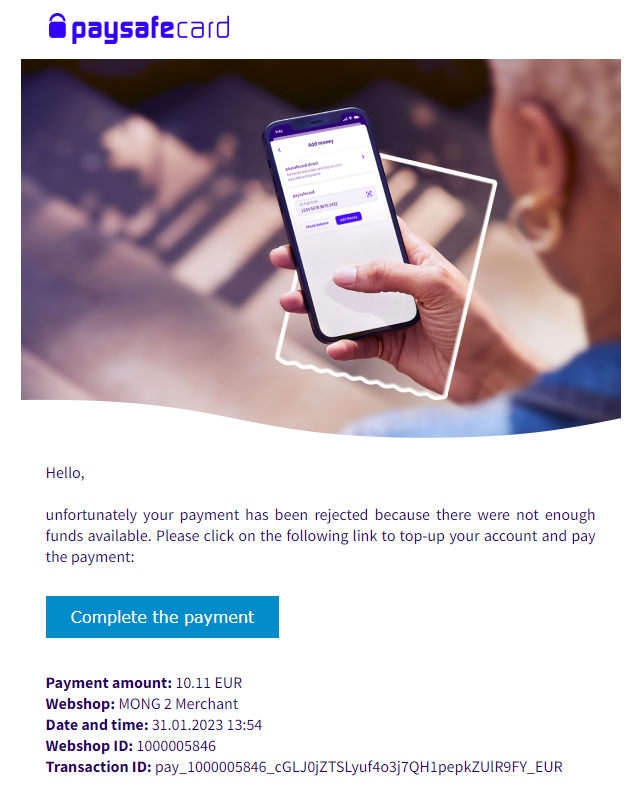
INITIATEDinstead of error code10011(insufficient_balance) - The customer will receive an email containing a link to complete the payment
- Once the customer completes the payment manually, a payment notification will be sent indicating a successful transaction
- The transaction status should then be verified using a
GETrequest
Behavior without Grace Period
If the grace period is not configured:
- The transaction will fail with error code
10011(insufficient_balance) - The customer will receive an email notification about insufficient funds, without the option to complete the payment
Customer email with grace period:
One‑Click Checkout Variation
A variation of the flow exists in which the customer is still redirected to the payment panel, but does not need to log in again for subsequent transactions.
This variation is available only for the REST API.
For this flow, customer consent can only be requested as part of a transaction.
To enable this behavior, the parameter automatic_payment_consent must be set to ONE_CLICK_OPTIONAL.
Flow Description
Once a transaction is created using the payment token, the customer must be redirected to the provided auth_url.
This auth_url contains an additional oneClick parameter:
- If the payment token is valid, the customer will skip the login screen and can directly authorize the transaction by clicking Pay.
- If the payment token is not valid, the customer will be redirected to the standard payment flow, including the login screen.
This flow requires a configuration change on the PaysafeCard side.
Please contact the integration team to enable it.