Requesting Customer Consent
There are two ways to request the customer's consent. Either you request the customer's consent during a transaction they make, or you request the consent separately.
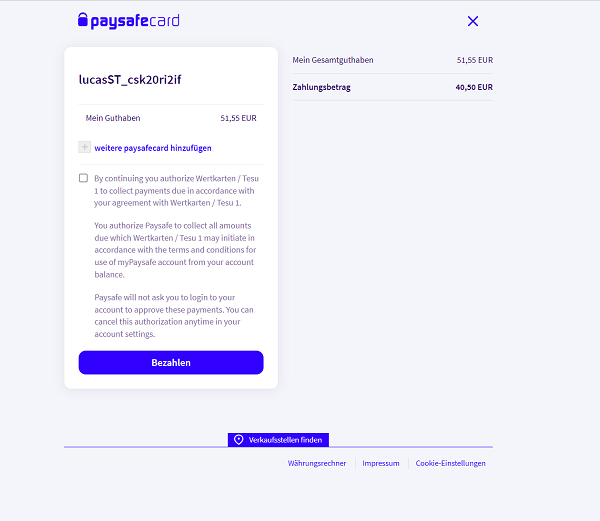
Customer consent during first payment
When initiating a payment, you must include the automatic_payment_consent parameter in the request.
The following values are supported:
-
OPTIONAL
Displays a consent checkbox during the payment process, allowing the customer to choose whether to grant consent. -
MANDATORY
Displays an informational message to the customer indicating that consent is required.
If MANDATORY is used, the business partner must provide a clear informational message to the customer on the checkout page before redirection.
Example message:
You will be forwarded to PaysafeCard, where you can authorize the merchant to perform automatic payments.
Below you can find additional information on the paramater
| Parameter | Description | Example | Info |
|---|---|---|---|
automatic_payment_consent | Needs to be added for customer consent. | OPTIONAL | (required) can be OPTIONAL or MANDATORY |
If you send this parameter, the customer's associationId will be returned in the API response.
The association ID will only be active if the customer accepts the consent checkbox.
Separate customer consent
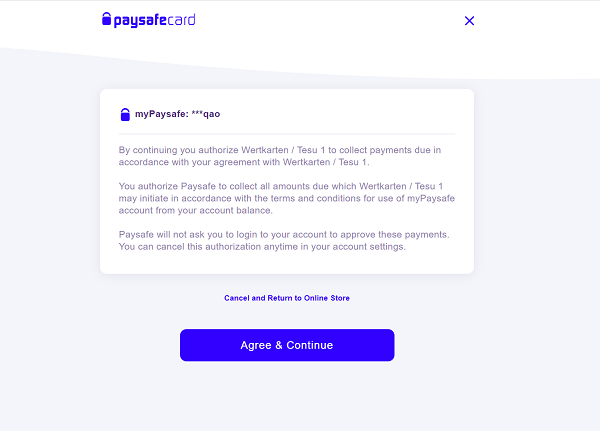
You can request customer consent separately without initiating a financial transaction in two ways:
Using the Association Endpoint:
Make a POST request to generate_association at the /v1/association endpoint. This request returns an association_url, where you must redirect the customer, along with an associationId.
The customer needs to confirm the request to activate the associationId. You can check the status of the association using a GET request to get_association.
Following parameters are used to build such request:
| Parameter | Description | Example |
|---|---|---|
currency | Currency. | EUR |
submerchant_id | Reporting Criterion (if used) | RC001 |
customer_id | Customer ID / Merchant Client ID (MCID) | CustomerId1234 |
success_url | URL the customer is redirected to after accepting. | https://website.com/success_url |
failure_url | URL the customer is redirected to after declining. | https://website.com/failure_url |
An example of a such request can be found below:
{
  "currency": "EUR",
  "submerchant_id": "Tesu_1",
  "customer": {
    "id": "merchantclientid5HzDvoZSodKDJ7X7VQKrtestAutomation"
  },
  "success_url": "https://notification.com/succeded",
  "failure_url": "https://notification.com/failed"
}
Using the Payment Endpoint:
Alternatively, you can request customer consent by making a initiate_payment request and setting the amount parameter to 0. This allows you to establish consent without initiating a financial transaction. In this case, including automatic_payment_consent is not required.
Both methods ensure that customer consent is obtained before proceeding with any further operations.
An example of a such request can be found below:
{
  "type": "PAYSAFECARD",
  "amount": 0.00,
  "currency": "EUR",
  "redirect": {
    "success_url": "https://www.guinbox.com/notes/uC5lKyzh74x",
    "failure_url": "https://www.guinbox.com/notes/FP8gU99Wj7u"
  },
  "notification_url": "https://webhook.site/ae057184-0e8b-47dc-b4ed-7c0c201d17f5",
  "customer": {
    "id": "customer_id2"
  }
}
Consent Revocation
Customer consent can be revoked at any time, either by the customer themselves or by Paysafe customer care upon the customer’s request.
If enabled, a webhook notification will be sent to the configured endpoint whenever a previously granted consent is revoked.
When it triggers
-
Revoked by the customer directly
-
Revoked by our customer care, upon the customer’s request
Example notification:
{
  "timestamp": 1760603384,
  "eventType": "AUTOMATIC_PAYMENT_CONSENT_CANCELLED",
  "version": "1",
  "data": {
    "mid": "1000001243",
    "submerchant_id": "2",
    "automatic_payment_consent_cancelled": {
      "cancelled_by": "USER",
      "association_id": "spi_B4AtVRxXIbNSTRIQXaNcjZKR4k",
      "cancelled_timestamp": 1760603384762
    }
  }
}
When it does not trigger
- Revoked by you via the specific API call