MIP Consent Request and Payment Process Flows
This section outlines the payment processes for all Merchant Initiated Payment (MIP) scenarios.
General Payment Process
-
The customer wants to give consent / the merchant requests the customer's consent
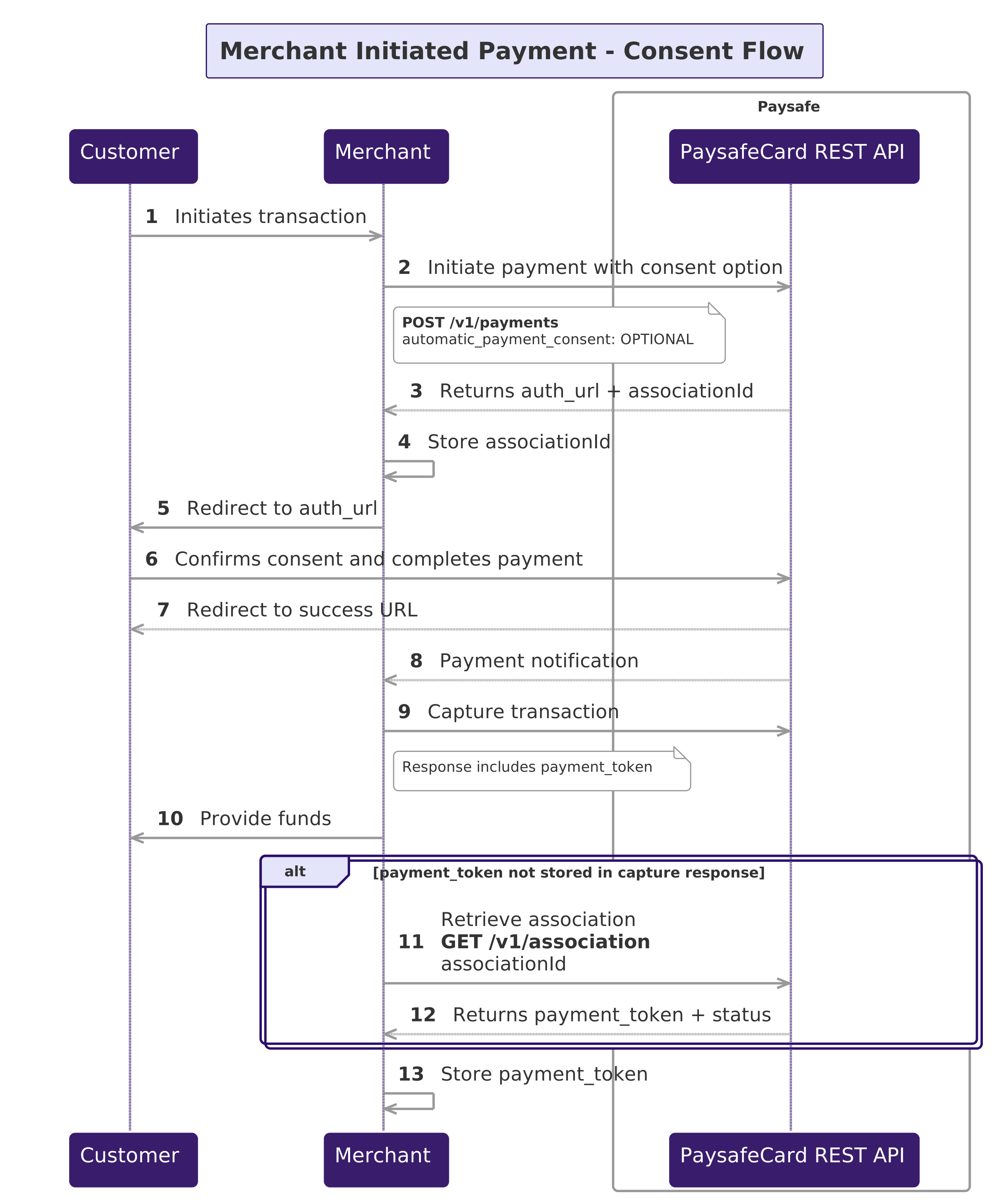
- 1.1 For a normal transaction with the option to automate for future transactions ("customer consent during first payment").
- 1.1.1 The merchant creates a transaction with
initiate_paymentwith the additional parameterautomatic_payment_consent. - 1.1.2 The merchant redirects the customer to the
auth_urlreceived in the response. - 1.1.3 The customer gives consent by logging in with their PaysafeCard account, activating the checkbox and paying for the transaction.
- 1.1.1 The merchant creates a transaction with
- 1.2 The merchant offers a separate consent button without the creation of a transaction.
- 1.2.1 The merchant generates the link to the separate consent page by making a
generate_associationrequest to the /v1/association endpoint. - 1.2.2 The customer gives consent by logging in with their PaysafeCard account and accepting the request.
- 1.2.1 The merchant generates the link to the separate consent page by making a
- 1.1 For a normal transaction with the option to automate for future transactions ("customer consent during first payment").
-
The merchant receives the customer's
associationId,- 2.1 in the API response to the
initiate_payment(flow 1.1). - 2.2 in the API response to the
generate_associationorinitiate_paymentwithamount0 request (flow 1.2). - 2.3 in the webhook notification if activated via the MSC or on PaysafeCard side (flow 1.2).
- 2.1 in the API response to the
-
The merchant receives the payment token.
- 3.1 Using the association ID from step 2, the merchant makes a the
get_associationrequest to the/v1/associationendpoint to receive thepayment_token. - 3.2 The merchant saves and relates the payment token to the customer's account.
- 3.1 Using the association ID from step 2, the merchant makes a the
-
The merchant creates a transaction on the customer's behalf.
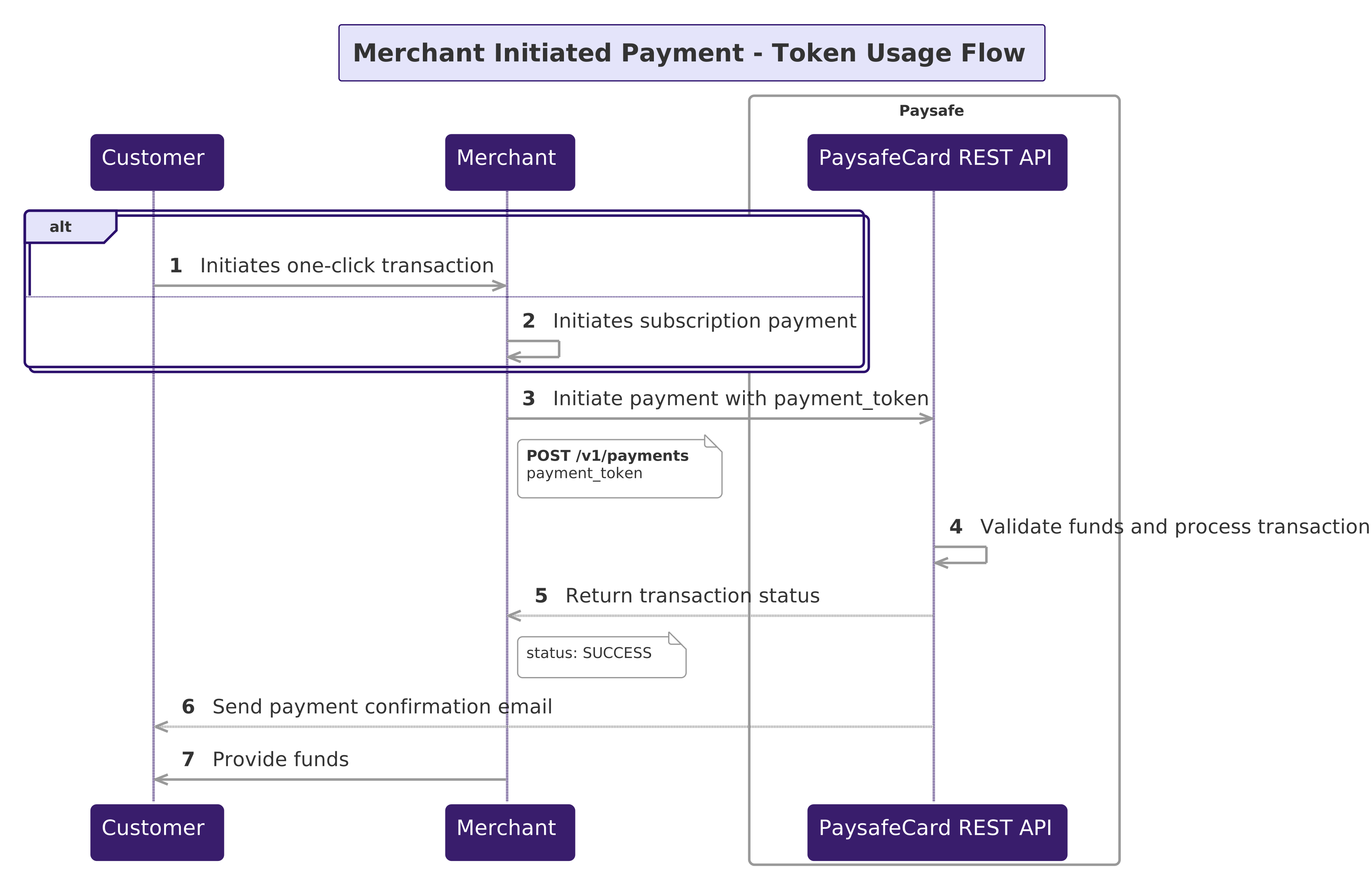
- 4.1 The payment token from step 3.1 is used to make an
initiate_paymentrequest by adding the parameterpayment_token. - 4.2 If the payment token is valid & the customer has enough funds, the transaction is automatically finished.
- 4.3 The merchant receives back the transaction status "SUCCESS", confirming that the transaction was successful.
- 4.4 Using a
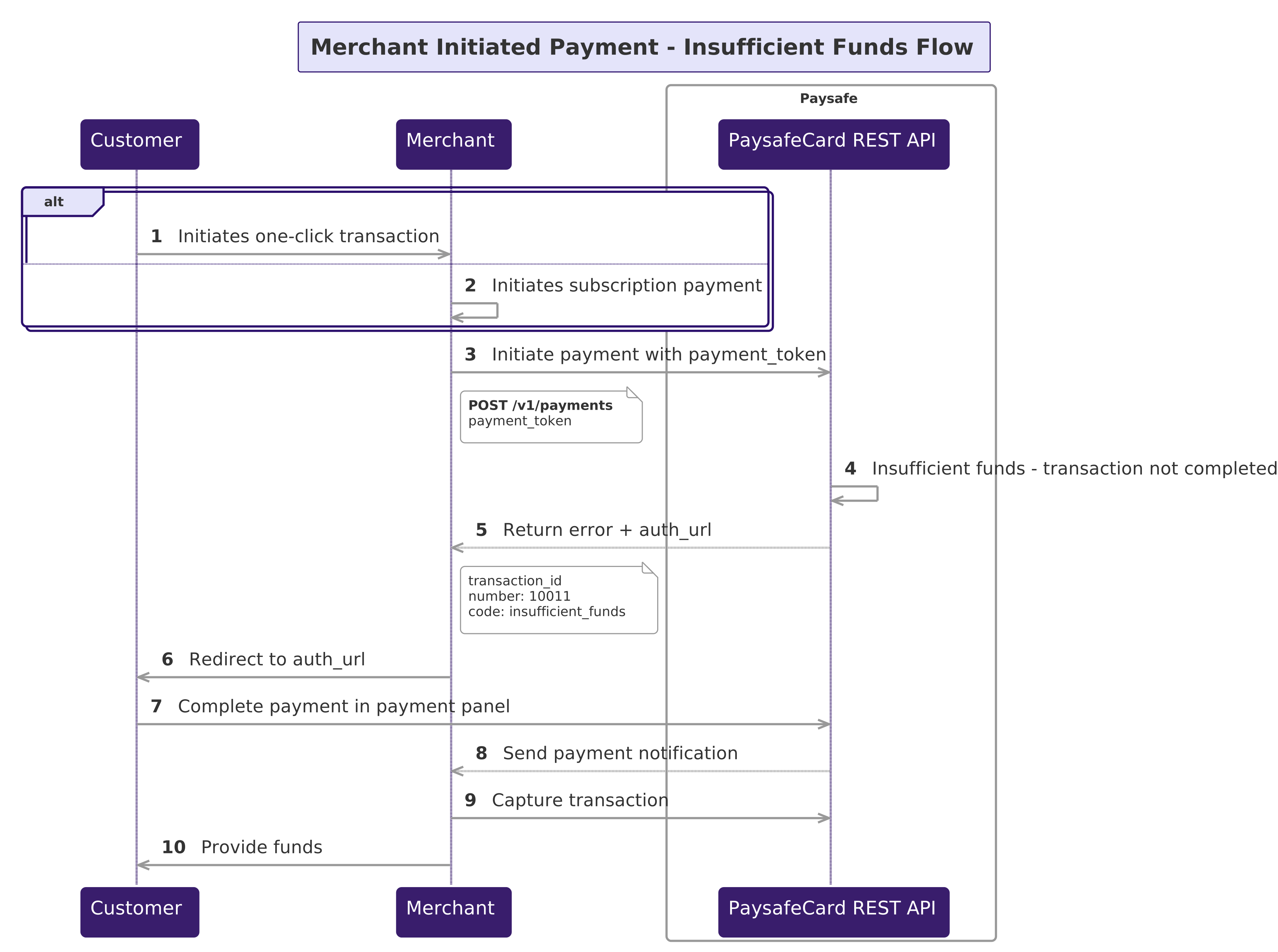
retrievePaymentDetailsrequest, the merchant can confirm the transaction status. - 4.5 (optional) If the customer didn't have enough funds in their PaysafeCard account, the customer can finish the transaction manually.
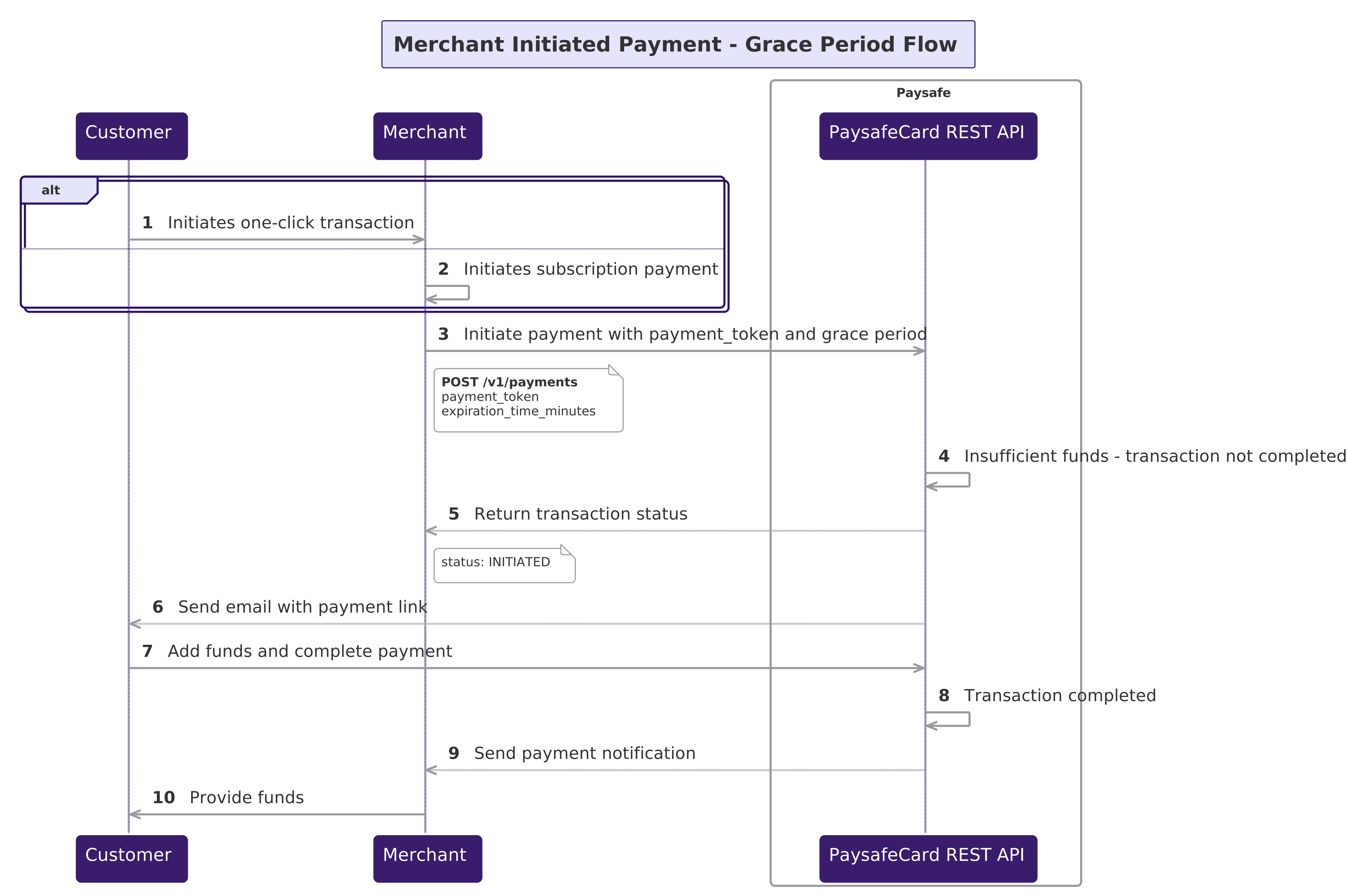
- 1 If using the grace period, the customer will receive an email with a link to login or you can redirect the customer to the auth_url.
- 2 If using the normal MIP flow, you will need to redirect the customer to the auth_url. The customer can then finish the transaction with the standard PSC flow.
- 4.1 The payment token from step 3.1 is used to make an
-
(optional) The merchant revokes the association / consent
- 5.1 The merchant makes a DELETE call to the
/v1/associationendpoint
- 5.1 The merchant makes a DELETE call to the
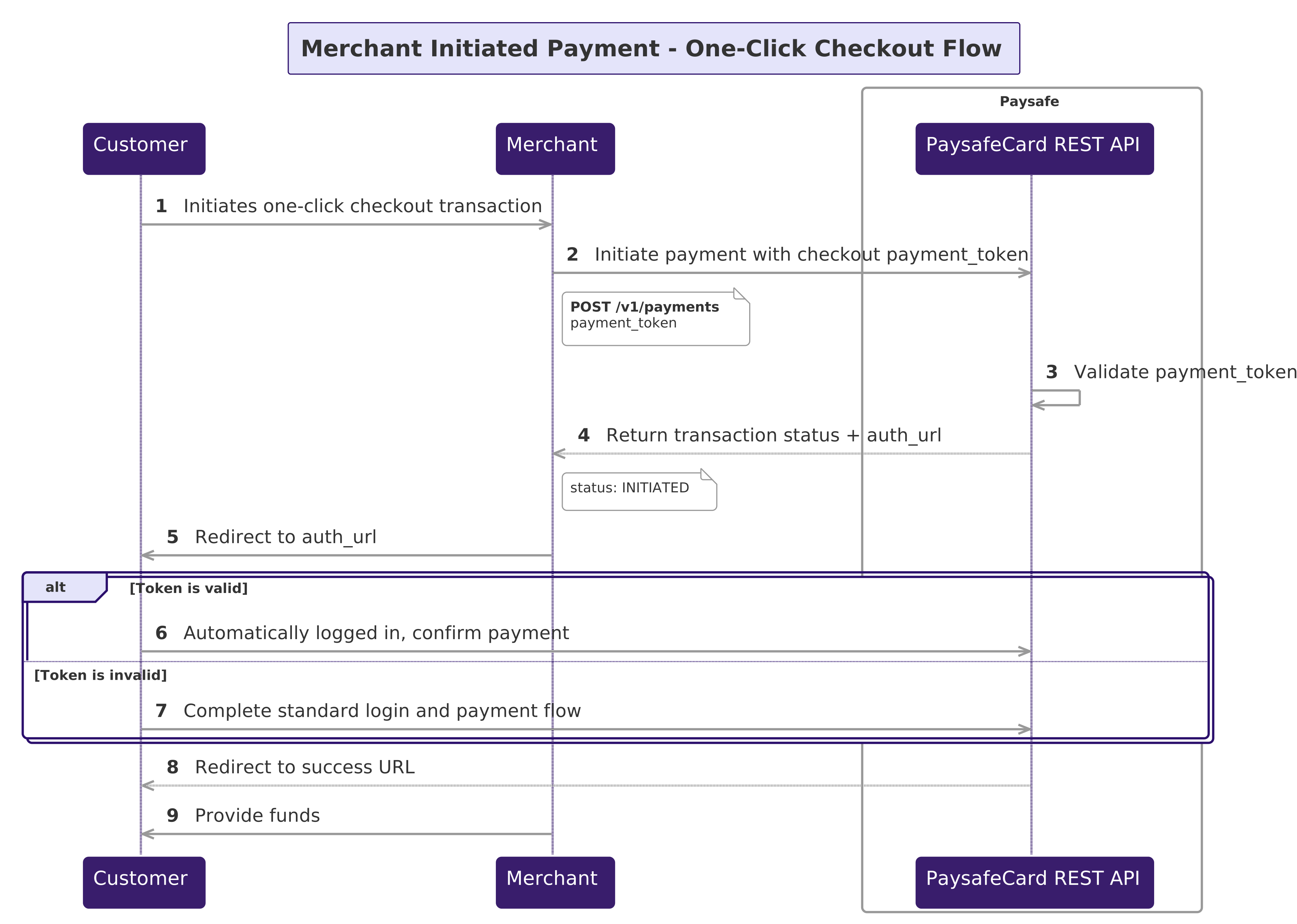
One Click Checkout Variation
- The customer wants to give consent / the merchant requests the customer's consent
- 1.1 For a normal transaction with the option to automate for future transactions ("customer consent during first payment").
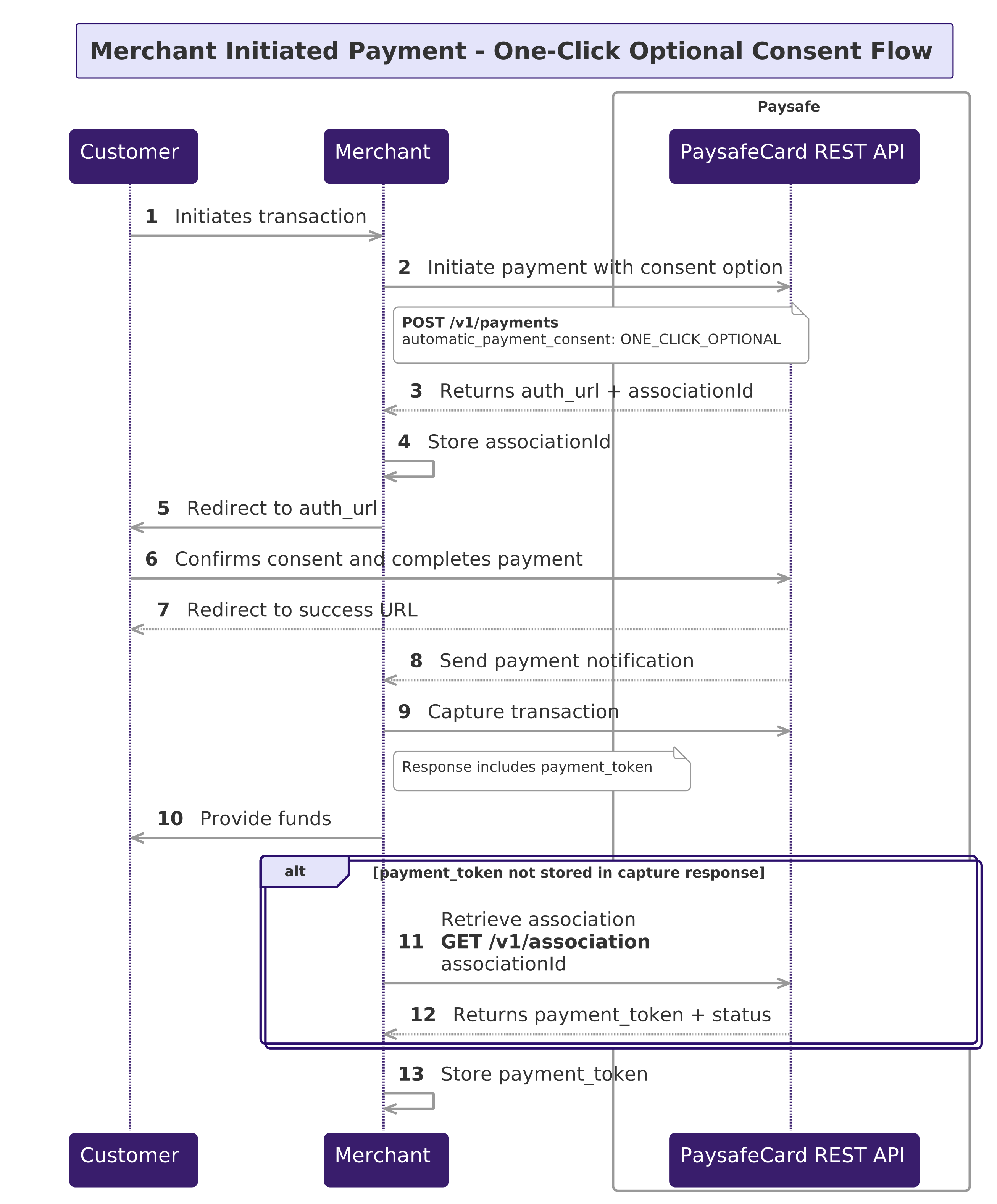
- 1.1.1 The merchant creates a transaction with
initiate_paymentwith the additional parameterautomatic_payment_consentwith the valueONE_CLICK_OPTIONAL. - 1.1.2 The merchant redirects the customer to the
auth_urlreceived in the response. - 1.1.3 The customer gives consent by logging in with their PaysafeCard account, activating the checkbox and paying for the transaction.
- 1.1.1 The merchant creates a transaction with
- 1.1 For a normal transaction with the option to automate for future transactions ("customer consent during first payment").
- The merchant receives the customer's
associationIdin the API response to the request.- 2.1 In the API response to the
initiate_payment
- 2.1 In the API response to the
- The merchant generates the payment token.
- 3.1 Using the association ID from step 2, the merchant makes a the
get_associationrequest to the/v1/associationendpoint to receive thepayment_token. - 3.2 The merchant saves and relates the payment token to the customer's account.
- 3.1 Using the association ID from step 2, the merchant makes a the
- The customer creates subsequent transactions
- 4.1 The payment token from step 3.1 is used to make an
initiate_paymentrequest by adding the parameterpayment_token. - 4.2 The merchant redirects the customer to the
auth_url. - 4.3 If the payment token is valid, the customer will skip the login and can authorize the transaction by clikcing on "Pay".
- 4.4 If the payment token is invalid, the customer will see the standard PaysafeCard flow.
- 4.5 Using a
retrievePaymentDetailsrequest and the payment notification, the merchant can retrieve the transaction status. - 4.6 The merchant finalizes the transaction with the
capturerequest and gives the customer the funds.
- 4.1 The payment token from step 3.1 is used to make an
- (optional) The merchant revokes the association / consent
- 5.1 The merchant makes a DELETE call to the
/v1/associationendpoint
- 5.1 The merchant makes a DELETE call to the
Customer Consent Request Flowcharts
This section graphically outlines the payment processes for all Merchant Initiated Payment (MIP) scenarios.
Customer Consent During First Payment
The following diagram illustrates the process of requesting customer consent during a standard payment, enabling future transactions to be executed on their behalf.
Separate Consent Flows
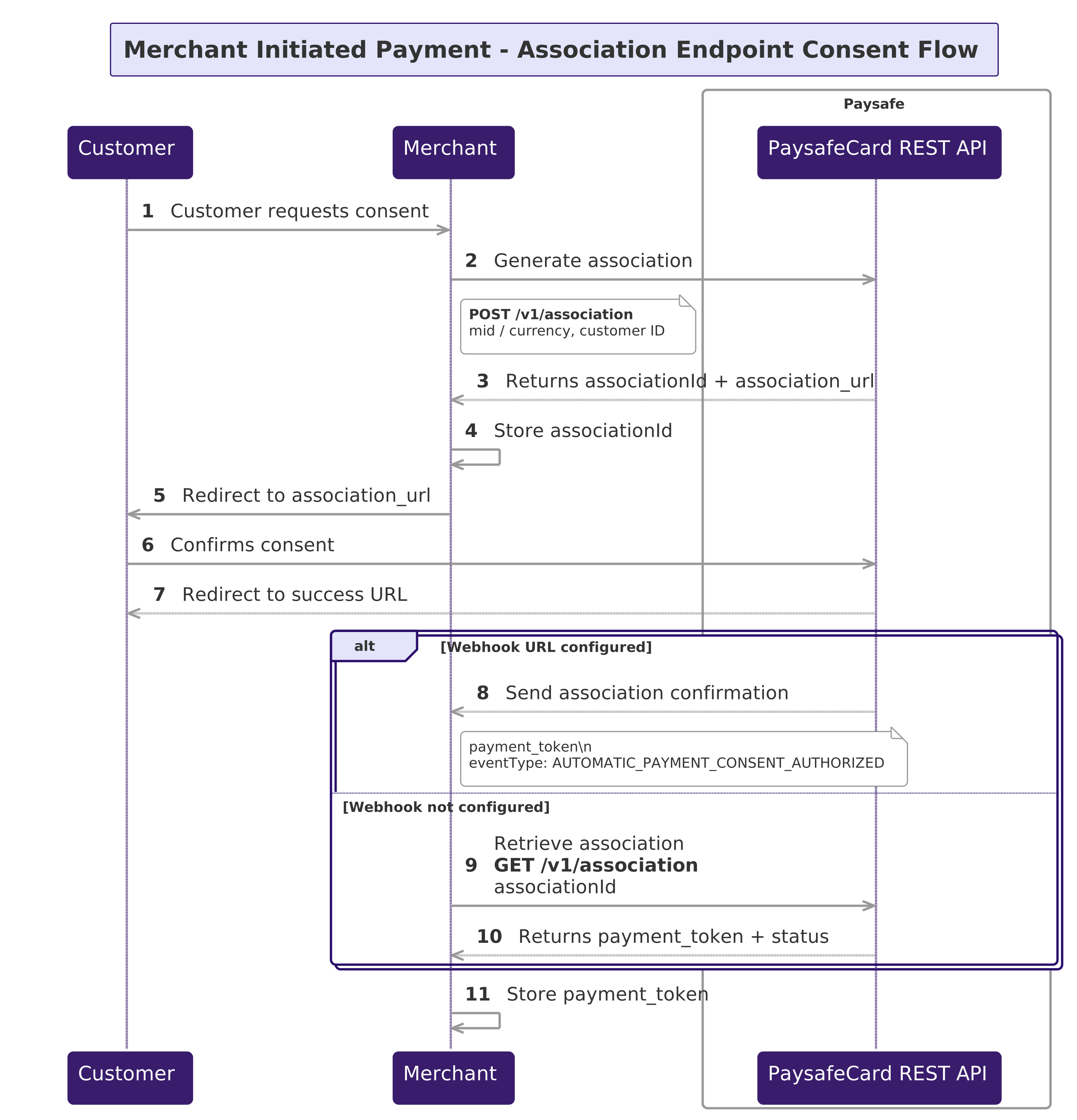
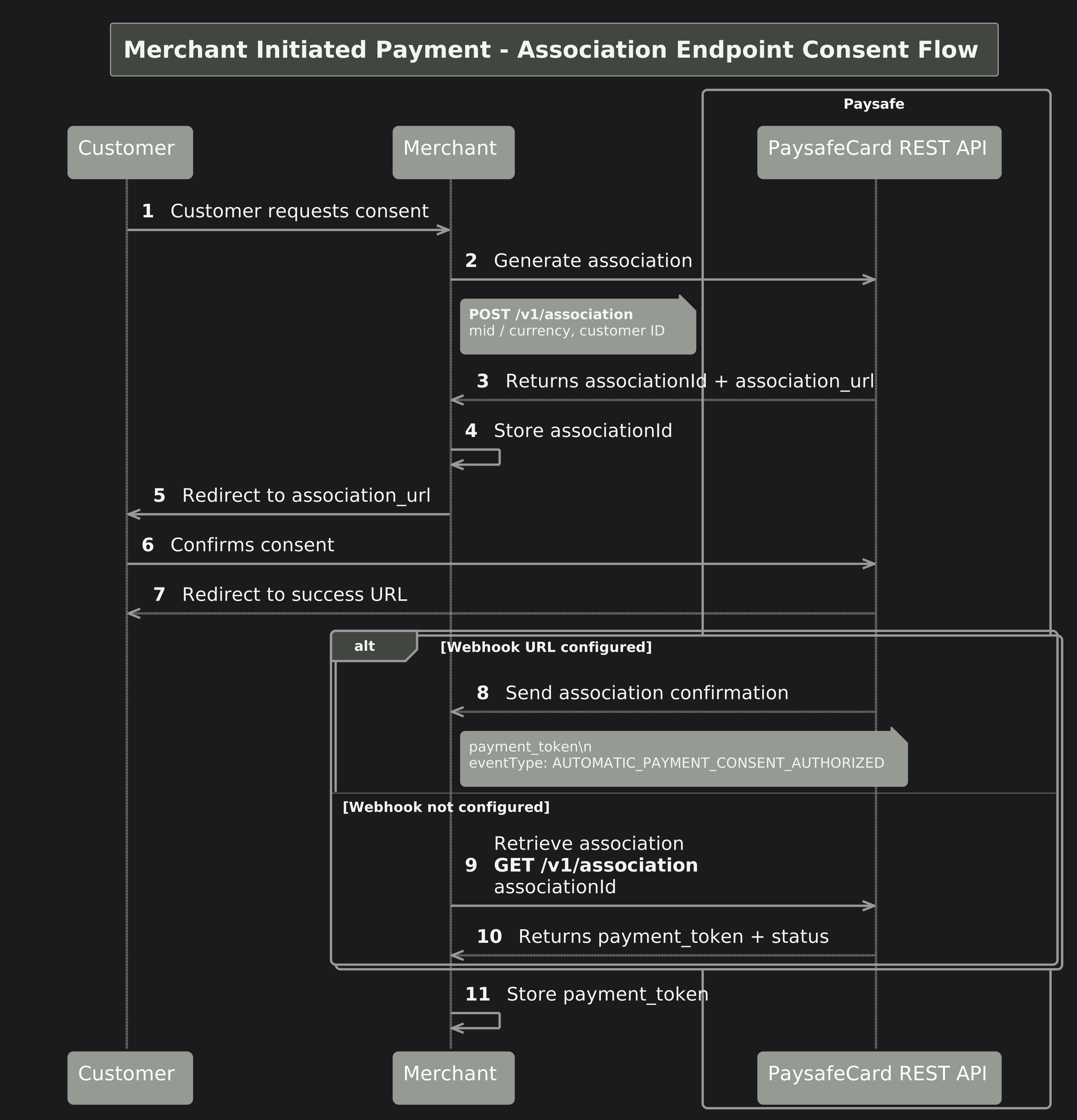
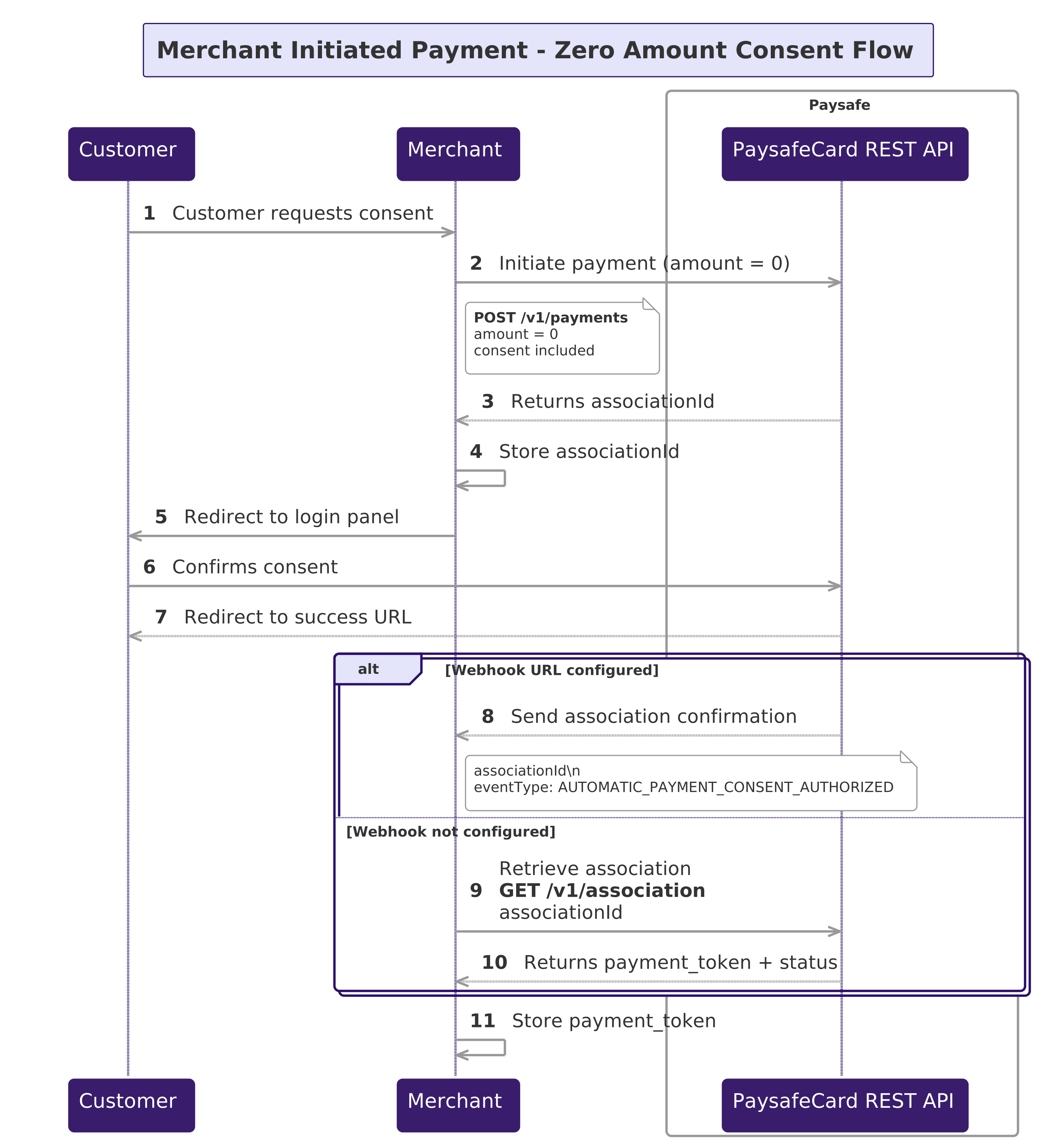
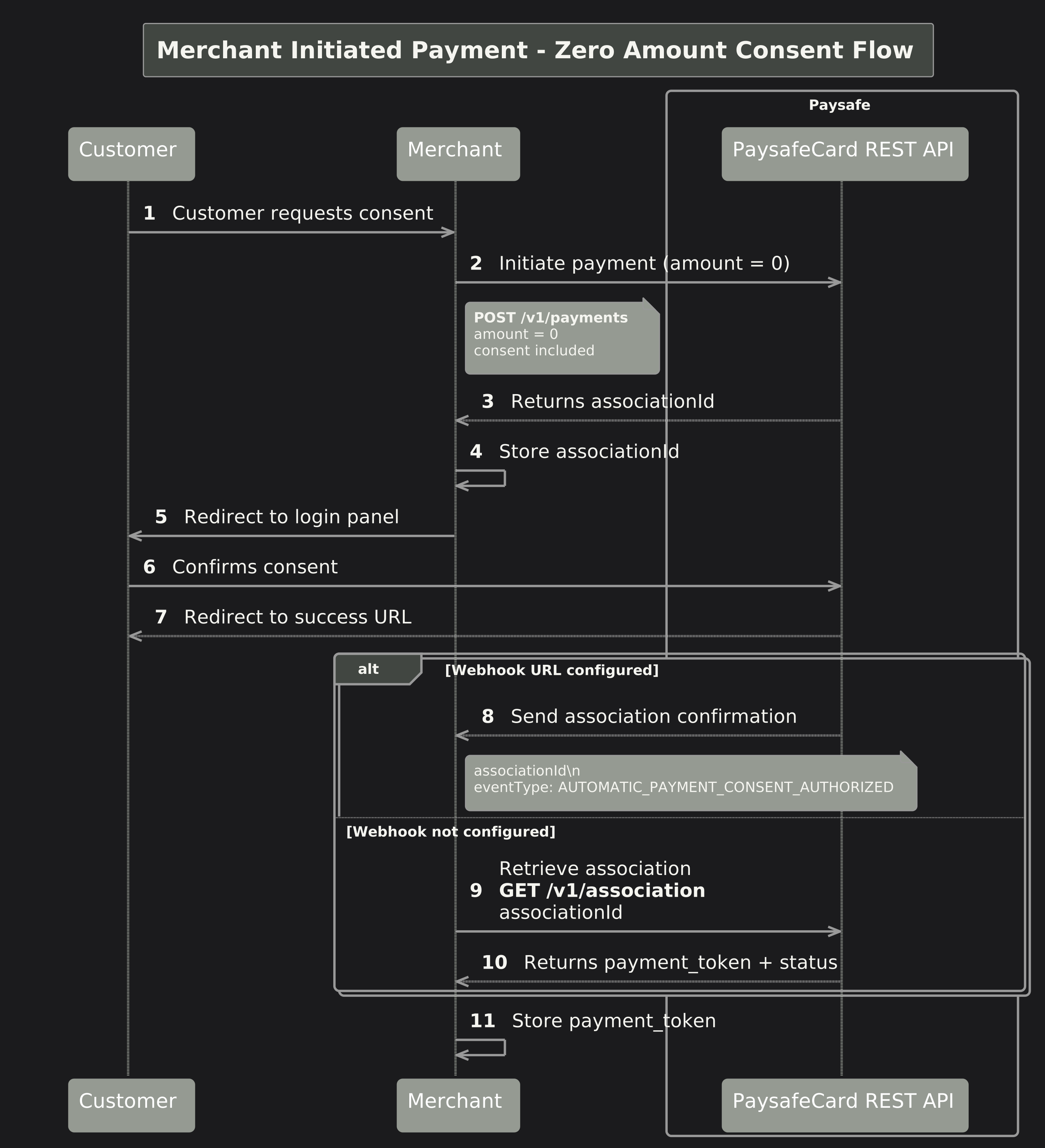
In addition to requesting customer consent during a standard payment, consent can also be obtained independently, without an initial transaction.
This approach allows merchants to decouple the consent process from the payment flow and collect the required authorization in advance.
Consent can be requested in two ways:
- by using the dedicated association endpoint, or
- by initiating a payment with an amount of zero, which has no financial impact
The following diagrams illustrate these alternative consent flows.
Using Association Endpoint
Using Payment Endpoint
Token Usage and Insufficient Funds Flows
The following section provides an overview of how payment tokens are used to execute transactions, along with the handling of insufficient funds scenarios for both one‑click and subscription payments.
The diagrams illustrate the different execution flows, including standard transaction processing and the mechanisms in place to recover or complete payments when sufficient funds are not availabl
Token Usage
Insufficient Funds - One Click Payment
Grace Period for Subscription/Recurring Payments
One Click Checkout
Initial transaction
Subsequent Transactions