Payment flow
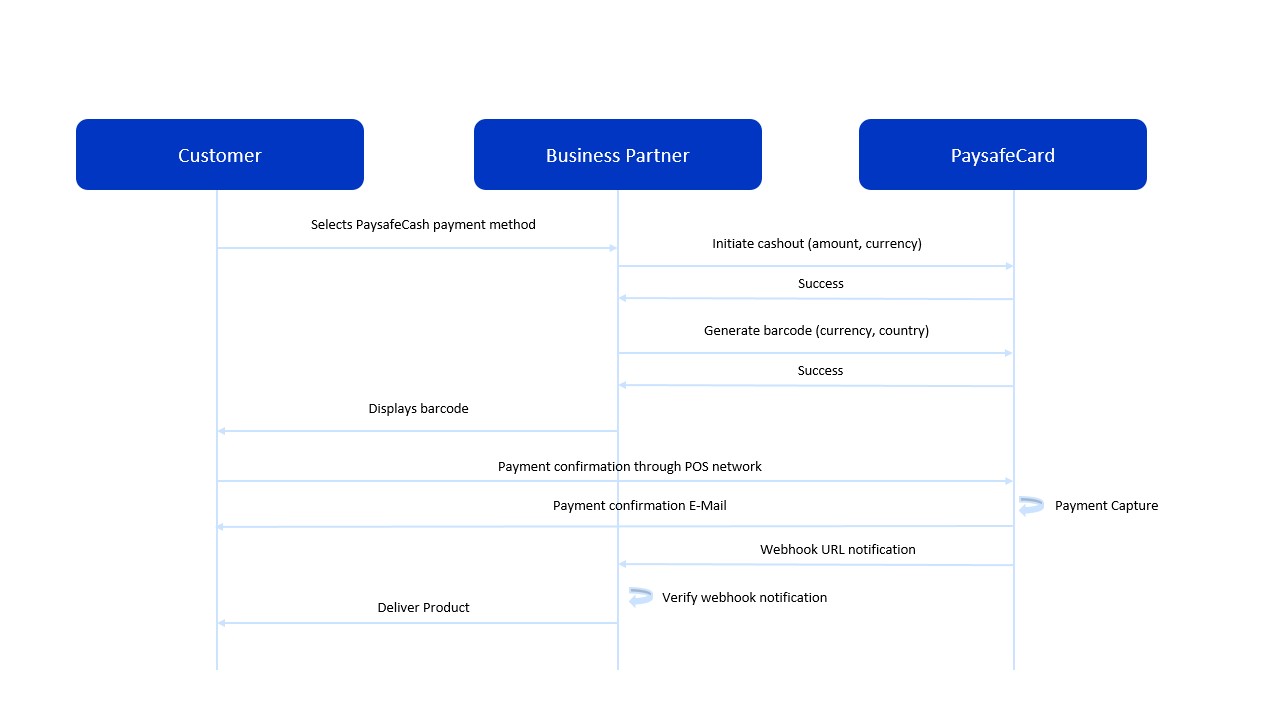
In this section, the payment flow is shown.
-
The customer selects PaysafeCash as the preferred payment option in your webshop.
-
The business partner initiates the payment with the correct amount, currency and other parameters.
-
The business partner generates the barcode for this specific payment.
-
The business partner displays the barcode to the customer according to the PaysafeCash interface guidelines.
-
The customer brings the barcode to a payment point, has it scanned and pays for the transaction amount. A predefined time frame ("Transaction Timeout”) will be available for the payment completion.
The duration of this time frame is by default 72 hours, unless specified otherwise by the business partner.
-
Once the payment is done at the POS, the money will be assigned to the transaction and PaysafeCash captures the payment on behalf of the business partner.
-
A webhook notification request is sent to the business partner.
-
The business partner must verify the webhook notification as described here.
-
Upon successfully verifying the webhook notification, the business partner completes the transaction in its database and delivers the product/service to the customer.
Important: Captured payments are irreversible.
Payment Process
This section describes in detail the technical process of a PaysafeCash payment.
-
The customer selects the PaysafeCash payment method.
-
Initiate Payment: Send POST request
initiate Payment-
2.1. If the response gives back http20x, redirect the customer to the barcode application (status of the transaction is "INITIATED").
-
2.2. If the response gives back http40x or htp50x, show an error message to the customer.
Initiate Payment error message: "Transaction could not be initiated due to connection problems. If the problem persists, please contact our (business partner) support."
-
-
Generate barcode: Send POST request
generate barcode(status of the transaction is "INITIATED")- 3.1. The barcode is returned as part of the response.
- 3.2. The business partner displays the barcode to the customer.
-
The customer brings the barcode to a payment point, has it scanned and pays for the transaction amount.
-
Webhook notification delivery: Since the transaction is paid and the amount assigned to the transaction, PaysafeCash captures the payment on behalf of the business partner (transaction status "SUCCESS") and the webhook notification is sent.
-
The business partner verifies the webhook notification as described here.
-
Upon successfuly verifying the webhook notification, the business partner completes the transaction in its database and delivers the product/service to the customer.
Important: Captured payments are irreversible.