PaysafeCash Reusable Barcode API
The business partner retrieves the PaysafeCash barcode (called "reusable barcode" going forward) using an API request and has full control on how the reusable barcode is displayed to the customer.
Reusable Barcode flow
In this section, the payment flow of a reusable barcode is shown.
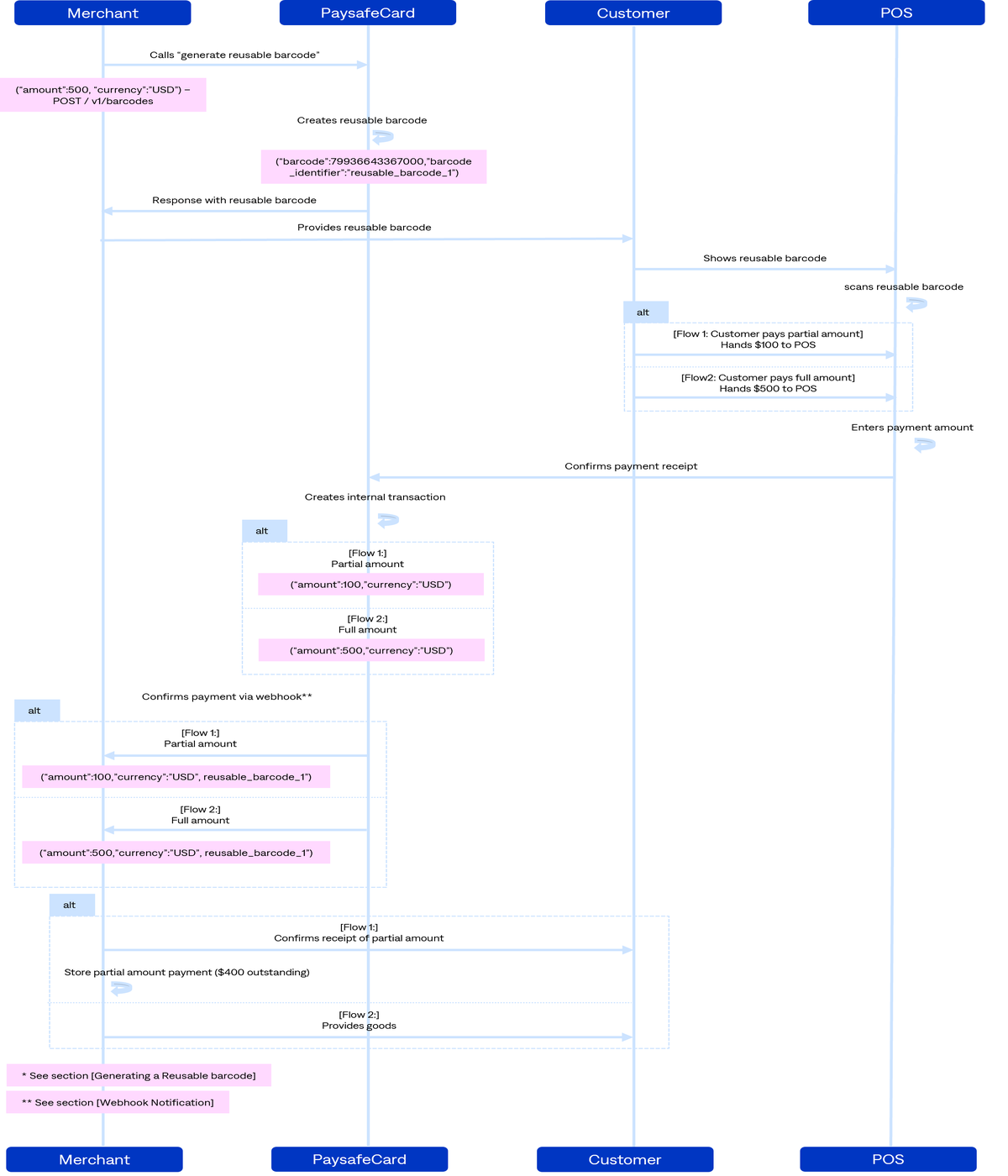
Group Payment Process
-
generate Reusable Barcode: send
POSTrequestgenerate reusable barcodes -
barcode and other details are returned in response
-
provide retrieved barcode to customer
-
customer brings the barcode to a payment point, has it scanned and pays for the transaction amount.
-
PaysafeCash creates and captures the payment
-
Webhook notification delivery: Since the transaction is paid and the amount assigned to the transaction, PaysafeCash captures the payment on behalf of the business partner (transaction status "SUCCESS") and the webhook notification is sent(PAYMENT_CAPTURED).
-
business partner verifies the webhook notification.
-
Upon successfuly verifying the webhook notification, the business partner completes the transaction in its database and delivers the product/service to the customer.
Reusable Barcode Information
The following section provides additional information about the payment process.
Reusable barcode status
| Value | Description |
|---|---|
ACTIVE | The initial state of a reusable barcode after it has been successfully created. |
INUSE | Barcode has been paid at least once |
USED | The barcode has reached the predefined maximum payment amount |
INVALIDATED | Barcode has been invalidated by the partner |
IDLE | Barcode has expired without being used. It will stay in this state for 6 month and then switch to EXPIRED |
EXPIRED | Allowed timeframe to use the barcode for payments has elapsed. |
HTTP status codes
| Code | Short Description | Description |
|---|---|---|
| 200 | OK | The request was successful. |
| 201 | Created | Object successfully created. |
| 400 | Bad Request | Invalid data provided in the request. |
| 401 | Unauthorized | Invalid or expired API key. |
| 403 | Forbidden | Unknown IP address. |
| 404 | Not Found | |
| 500 | Internal Server Error | This indicates a general technical error on PaysafeCash's end. |
| 501 | Not Implemented | Version feature not implemented. |
| 502 | Bad Gateway | Invalid response from upstream system. |
| 503 | Service Unavailable | Server overloaded. |
| 504 | Gateway Timeout | Timeout from upstream system. |
Below is an example of an error response:
   400 Bad Request

   {
      "code": "invalid_request_parameter"
      "message": ""must contain 1-10 digits, followed by a decimal separator '.' followed by 2 digits",
      "number": 10028,
      "param": "amount"
   }
customer id
Also known as "Merchant Client ID", the customer id is an important parameter for the integration of PaysafeCash.
The customer id identifies the Customer on our business partners side.
The most optimal customer id is a completely random value. A value that uniquely identifies the customer and is disconnected from any personal information.
This value should be the same for all transactions of the customer.
Here are Guidelines for possible customer ids:
Valid Values:
| Value | Type |
|---|---|
2c3be0b50c7a5f1964a63d78f38a6ffc41c027e9 | SHA1 - test@123.com |
742f2b1a55cd5d606ea44b4fcb54646a | MD5 - test@123.com |
3a5b0d0777dead9df93d502df85c8180e53804eb | SHA1 - UsernameValue1 |
3192481752123 | Random Customer Identifier |
CustomerID1 | Customer Identifier free of personal information |
Invalid Values:
test@123.comUsername_1FirstName123LastName123TimestampIP Address
Please note that sending any form of the invalid values will not be accepted.
If you intend to process payments on multiple brands, please inquire about the possibilities of separating multiple entities for your account.