Payment process on an existing PaysafeCard MID - SOAP
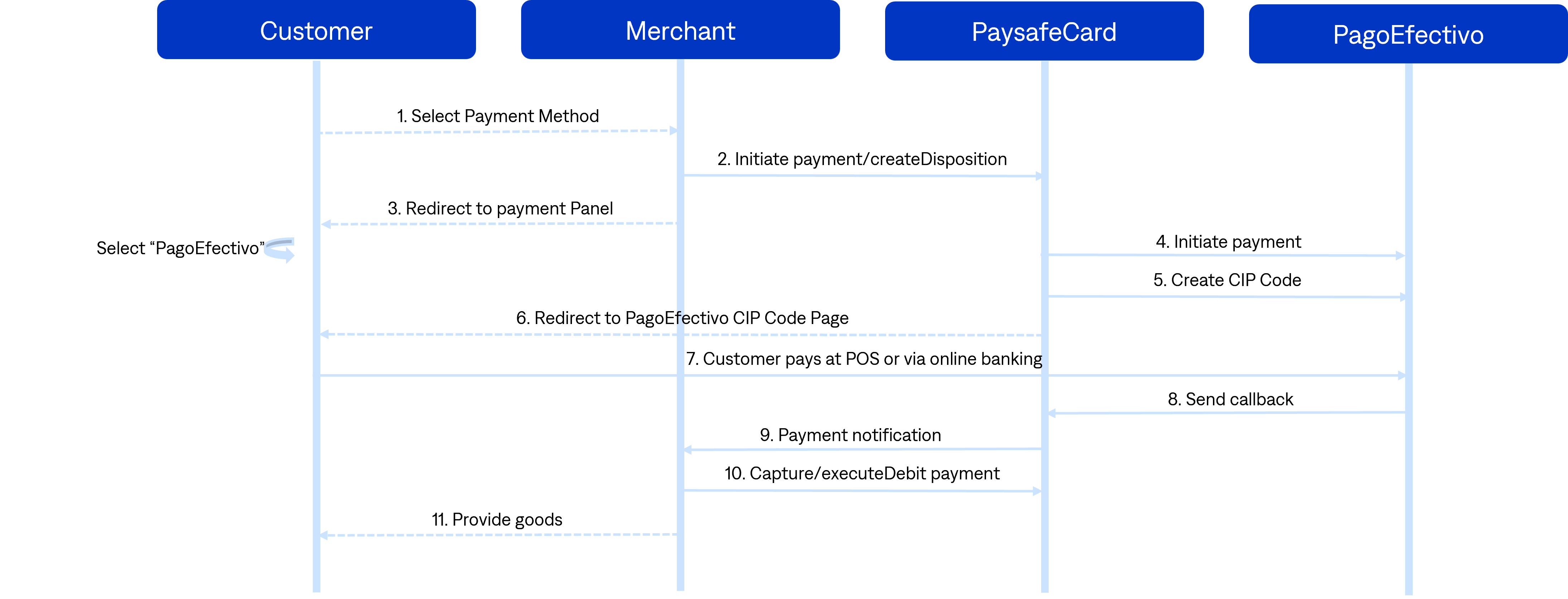
The following section describes the SOAP payment process on an existing PaysafeCard MID. The customer starts on the business partner checkout page, is redirected through the PaysafeCard payment panel, selects PagoEfectivo, receives a CIP code, and completes the payment before the merchant performs the final debit step.
-
The customer selects the payment method at the business partner checkout page: PaysafeCard or PagoEfectivo.
-
createDisposition: the business partner makes the SOAP requestcreateDisposition.- 2.1. If the result and error code is
0, the business partner redirects the customer to the payment panel. - 2.2. If the result or error code is not
0, the business partner shows an error message to the customer.
Transaction could not be initiated due to connection problems. If the problem persists, please contact our business partner support.
- 2.1. If the result and error code is
-
Redirection to the payment panel with
getCustomerPanel: the customer reaches the PaysafeCard payment panel or the PagoEfectivo panel.- 3.1. The customer selects PagoEfectivo on the PaysafeCard payment panel.
- 3.2. The customer is redirected to the PagoEfectivo hosted payment page.
-
The customer receives a CIP code.
- 4.1. The customer has to go to a Point of Collection or pay for the CIP code with one of the available payment options.
-
Payment notification delivery: since the card is assigned to the transaction (transaction status
S), PaysafeCard sends a notification to thepn_url. -
pn_urlhandling: right after the payment notification delivery, the business partner performs the requestgetSerialNumbersto check the status of the transaction.- 6.1. If
getSerialNumbersreturns the statusS, immediately perform theexecuteDebitrequest. - 6.2. If the response to
executeDebitreturns result and error code0, the business partner makes a user account top up accordingly or delivers the goods.
- 6.1. If