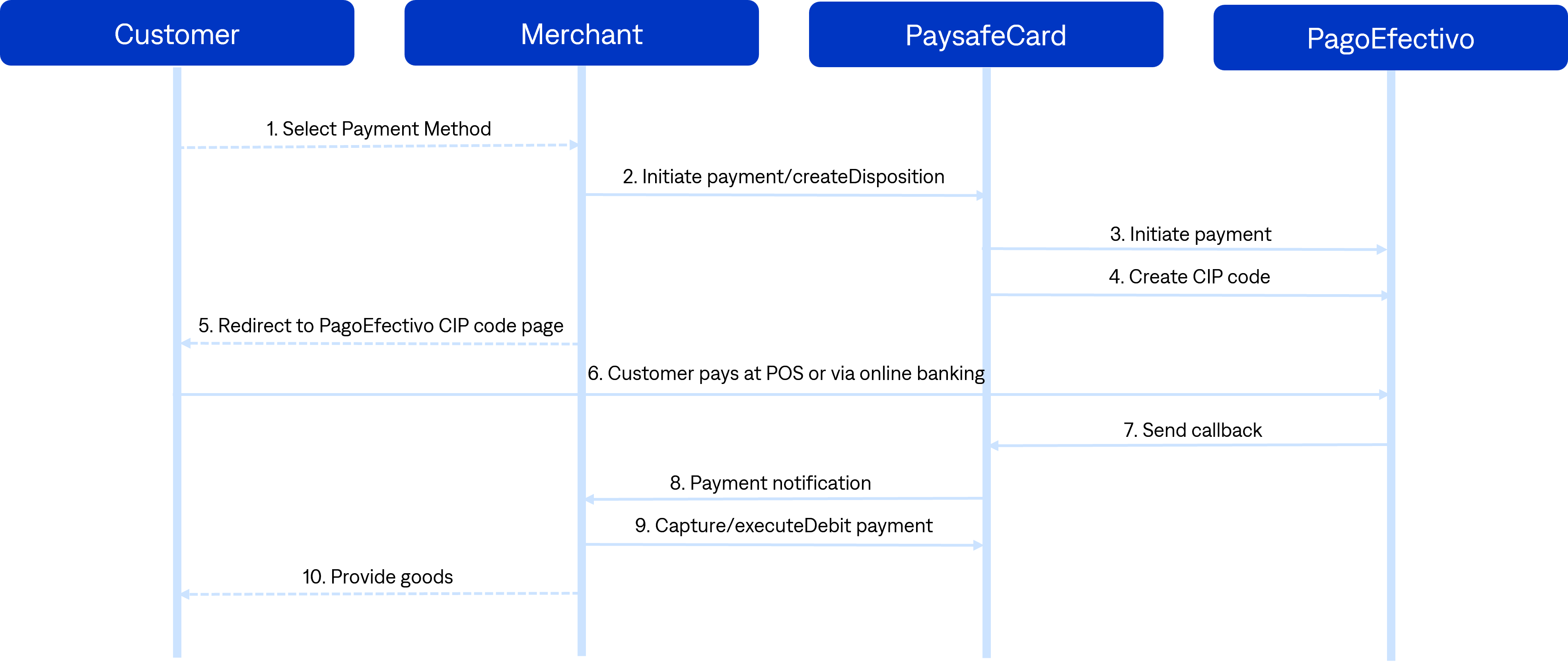
Payment process on a new MID where only pagoEfectivo is activated - SOAP
-
The customer selects the payment method at the business partner checkout page: PaysafeCard or PagoEfectivo.
-
create Disposition: the business partner makes the SOAP request
createDisposition.-
2.1. If the result and error code is
0, the business partner redirects the customer to the PagoEfectivo payment page. -
2.2. If the result or error code is not
0, the business partner shows an error message to the customer:Transaction could not be initiated due to connection problems. If the problem persists, please contact our (business partner) support.
-
-
Redirection to the PagoEfectivo payment page with
getCustomerPanel: the customer reaches the PagoEfectivo payment page. -
The customer receives a CIP code.
- 4.1. The customer has to go to a Point of Collection or pay for the CIP code with one of the available payment options.
-
Payment notification delivery:
Since the card is assigned to the transaction (transaction status"S"), PaysafeCard sends a notification to thepn_url. -
pnUrlhandling:
Right after the payment notification delivery, the business partner performs the requestgetSerialNumbersto check the status of the transaction.- 6.1. If
getSerialNumbersreturns the status"S", immediately perform theexecuteDebitrequest. - 6.2. If the response to
executeDebitis result and error code is0, the business partner makes a user account top up accordingly or delivers the goods.
- 6.1. If